


A Popular Analytics Dashboard Option
The MonsterInsights plugin is a clear favorite for adding Google Analytics support to a WordPress website.
You can use it as a simple way to add GA tracking code to a website.
And, if you configure it to connect directly to your Google Analytics account, you can then use its dashboard functionality to report key visitor metrics right inside your WordPress admin area.
As I mentioned above, this means you won’t have to log into Google Analytics each time you want to check your most important visitor stats.
(You can still access your GA reports directly, of course. That’s always helpful when you want to drill down further into your analytics data, create special filters and segments, etc.)
Here’s a quick overview video for MonsterInsights.
A Non-Google Analytics Dashboard for WordPress
For an alternative to Google Analytics on WordPress sites, Visitor Analytics IO is worth a look. It includes all the essential visitor metrics and organizes them into a clean dashboard presentation for you.
See the intro video directly below for a closer look.


Multi-Purpose Plugin with Visitor Stats and Dashboards
Jetpack was one of the very first plugins I encountered and used when I first got started with WordPress. It’s a big, multi-purpose plugin from the team at Automattic.
It’s sort of a ‘do-everything’ plugin, covering website security, performance, management, visitor stats, content promotion, and other things important to WordPress site owners.
Jetpack’s core features are always free. Of course, there’s a paid upgrade path as well.
Jetpack’s services are provided and hosted by WordPress.com, so a free account there is also required in order to connect your WordPress.org site to Jetpack.
Jetpack Analytics
As mentioned above, Jetpack is an extremely broad plugin that covers lots of WordPress website needs.
Purely from a visitor stats perspective, Jetpack provides the following:
- Easy setup and connection to WordPress.com, with no additional scripts or coding required
- Doesn’t require Google Analytics, but can easily co-exist alongside GA
- Reports all the most important visitor metrics, including page and post stats, time period metrics, visitor geographic locations, referrers, search terms, etc.
- Stats are available on your hosted WordPress dashboard and also on WordPress.com
- Also available via mobile app
Jetpack Pricing
Jetpack starts with an “always free” level, followed by three paid tiers: Personal, Premium, and Professional. Site stats are available at all levels.
See Jetpack’s pricing details here.
The paid tiers range from $39 to $299 yearly cost. Plans can be modified at any time, and there’s a 30-day full money-back refund guarantee.
Features vary per pricing tier, of course. They are organized into 6 areas: WordPress Security, Performance, Traffic & Revenue, Site Activity, free WordPress Themes, and Support.
Generally, you get more in most of these areas as you bump up from one tier to the next.
Jetpack Summary
Sometimes using a single multi-function plugin from a trusted developer is better and easier than cobbling together a bunch of single-purpose WordPress plugins from various developers.
That’s when Jetpack warrants serious consideration.
If your main priority at the moment is getting good visitor metrics into your WordPress admin view, then Jetpack may be overkill for you.
It does a lot more than just provide site visitor stats.
But, if you want decent visitor stats and dashboards, plus several of the other capabilities provided by Jetpack, then it’s definitely worth a closer look.
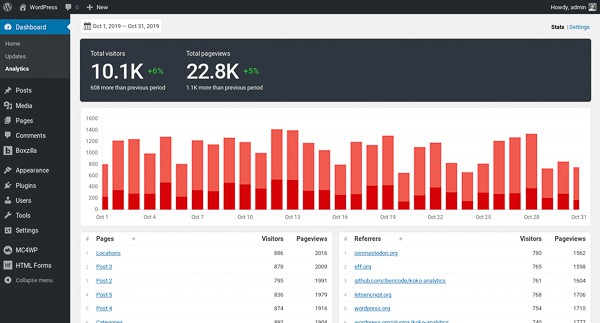
Simple Visitor Stats Dashboard Plus Data Privacy
Built by a small distributed team based in The Netherlands and other corners of the globe, Koko Analytics earns a solid 5 stars so far and has 5000+ active installations.
This is a privacy-friendly WordPress analytics platform that does not rely on any 3rd-party services. GDPR-compliant and no Google Analytics required.
And, as you can see in the screenshot image above, the Koko Analytics dashboard is easily accessible right there in your WordPress admin view.
Koko Analytics Summary
Koko Analytics is a straightforward, ‘minimalist’ solution for any WordPress site owner wanting core analytics functionality without giving up data ownership or visitor privacy.
If you need a core set of visitor metrics inside your WordPress dashboard and don’t want the added complexity or potential data privacy concerns of Google Analytics, then this plugin may be just right for you.

Comprehensive Analytics with Dashboard Views
Matomo (formerly Piwik) is an open-source, non-Google analytics platform that is focused on its customers having 100% data ownership and strong user privacy protections.
Matomo is used on over 1.4 million websites in over 190 countries. They have cloud-based as well an on-premises options for data storage.
See their video overview below.
Matomo Dashboard View
The screenshot below shows a typical dashboard from the native Matomo interface.
If you want to pull key Matomo stats directly into your WordPress dashboard, then also take a look at this additional plugin: https://wordpress.org/plugins/wp-piwik/

Matomo Pricing
Matomo pricing varies by tier level and also by cloud vs. on-premises hosting plan selected.
Cloud hosting comes at three levels: Essential, Business, and Enterprise. Pricing here ranges from US $19 per month to $TBD (customized) at the Enterprise level.
Cloud-hosted data is stored in Frankfurt, Germany.
WordPress installations are self-hosted (on premises), so everything runs on your WordPress server.
All core features are included for WordPress installations, including WooCommerce analytics.
Premium options include:
- Search Engine Keywords Performance ($79/year)
- Funnels ($99/year)
- Users Flow ($39/year)
- Heatmap and Session Recording ($119/year)
- Paid Advertising Performance ($89/year)
- Custom Reports ($119/year)
- Forms ($89/year)
- Media Analytics ($89/year)
- Multi-Channel Conversion Attribution ($39/year)
- Cohorts ($59/year)
Optional features that are *not* available for WordPress installations include Activity Log, White Label, A/B Testing, Roll-Up Reporting, and the SAML and LDAP integrations.
Matomo Summary
Matomo is a good option for those interested in a non-GA approach to website analytics, while still having access to flexible visitor metrics dashboards.
With strong data privacy protections, flexible hosting options for WordPress and non-WordPress sites, and a menu of paid add-ons, Matomo is an important player in the web analytics industry.

Analytics Dashboard with Locally-Stored Visitor Stats
Built by VeronaLabs, WP Statistics is another option for website owners who want comprehensive user stats that are stored locally on their own WordPress server / installation.
As shown below, the stats dashboard for WP Statistics is integrated directly into the familiar WordPress admin area.
The ‘Screen Options’ check boxes at the top will also look familiar to WP admins. These options let you include only the metrics areas you’re most interested in as part of the high-level dashboard view.

Of course, you can always drill down deeper into specific reporting areas in WP Statistics.
Here’s an example of the Top Pages report.

WP Statistics Conclusion
WP Statistics is a highly-rated, straightforward WordPress visitor stats plugin for those who want essential website traffic metrics accessible right inside their WP admin area.
With a good basic free level and a handful of low-cost premium add-ons, WP Statistics fits in nicely as a self-hosted WordPress website analytics option that also offers a flexible and configurable dashboard view.

More Buzz for Your WordPress Dashboard
Developed by the WordPress plugin pros at WPMU DEV, Beehive Analytics has evolved from a paid-only analytics plugin to a free version with access to other pro plugins via the WPMU membership plan.
Beehive adds a broad range of analytics reports directly to the WordPress dashboard, all based on your existing Google Analytics setup. Simply follow the directions to connect Beehive to your website’s GA property to get started.
Here’s a quick product screenshot. Reporting areas include the familiar metrics: Sessions, Users, Pageviews, Pages/Session, Average Session Duration, and Bounce Rates.


Beehive Analytics Pricing
Beehive is free, with no requirement to add paid options.
WPMU does offer good paid plugins for other functions important to WordPress users. So you may see some promotional messages for these when using Beehive.
Beehive Analytics Conclusion
WPMU is a known and trusted WordPress development shop. I consider Beehive to be a strong free option for adding Google Analytics reports to WordPress dashboards.