
Last updated Apr 14, 2025
How Website Hosting Impacts SEO
For a serious website that is key to any business or organization, good website hosting is critical for a number of reasons.
One of those reasons is SEO performance. For example, for any website owner who aims to get a large portion of their traffic via organic search channels like Google, Bing, Yahoo, Yandex, or other major search engines.
This post looks more closely at how website hosting impacts SEO.
As we’ll explore below, your hosting choice can directly and indirectly affect your website’s SEO performance in many ways.
Let’s take a closer look…

This post contains referral links to select vendor partners. We may receive compensation for purchases made via these links, at no additional cost to buyers.
Does Website Hosting Impact SEO?
Website Hosting and the SEO Connection
Does your choice of website hosting impact your SEO?
Can your organic search performance get better or worse depending on how and where you host your website or blog?
The short answer to these questions is a definite YES.
Website hosting can affect SEO in a wide variety of ways — from speed considerations to reliability/uptime, server resources, and timely technical support when minutes matter.
Let’s take a closer look below at the major SEO factors related to website hosting.
Primary SEO Factors for Choosing Website Hosting
SEO-Impacting Areas to Consider When Picking a Website Host
SEO considerations for your website or blog cover a wide range of things.
Some of these — such as many on-page content SEO factors — are mostly independent of your hosting provider.
For example, your page-level and post-level content will likely be exactly the same no matter where you host your site.
Other factors with SEO impact, however, do have a direct connection to your choice of website hosting. Areas such as security, speed, uptime reliability, and other factors come into play, and these can all affect your site’s SEO.
A Little Background First
When I first launched this (‘iBeam’) WordPress website and blog 15+ years ago, I went with Bluehost shared hosting based on a recommendation from a WordPress expert.
I was happy with Bluehost for several years but then moved over to SiteGround for better performance and other features. I’m still with SiteGround today, for this site and a few other websites I operate.

Related: Learn more about using SiteGround for hosting WordPress websites, including more from my own experience and other SiteGround overview info.
(By the way, I think Bluehost is still a good option for many website owners, especially those just starting out.)
With that additional context from my own experience, let’s look first at several of the primary SEO-impacting areas of your website hosting decisions.
Website Type, Size, and Purpose
For the purposes of this post, I assume you have a website or blog that is very important for your business or organization.
And that SEO — search engine optimization — is also important as a traffic driver that attracts new visitors to your site. Organic search may even be your primary traffic driver, in which case good SEO definitely matters to you.
Still, there are a few distinctions worth noting here.
For example, a website or blog for a very small regional business will have different hosting and SEO concerns vs a large multinational enterprise website with thousands of pages and articles and a global audience.
And, a small online storefront with only a handful of products will have different SEO-related hosting needs vs a global e-commerce retailer with hundreds of thousands of product pages to manage.
So, website hosting considerations (and their SEO implications) can vary quite a bit from one business to another — even when the websites are ‘business critical’ in all cases.
Now let’s look at the most critical SEO impacts of website hosting.
Website Speed & Performance — A Primary SEO Concern
The speed at which your website loads is a critical SEO factor. Search engines, particularly Google, consider page speed as a ranking factor.
A slow website can result in a poor user experience (UX), leading to higher bounce rates, page and site abandonment, e-commerce revenue losses, and lower rankings when search engines detect these issues.
Choose a hosting provider that offers fast and reliable server performance, as well as options for content delivery networks (‘CDNs’… see more below) to improve your website’s loading times.
From a hosting perspective, slow websites are often the result of overloaded ‘shared hosting’ environments from which your website content is served.
Shared hosting is often a good starting point for many websites and blogs gaining initial visibility and traction, but can become a limiting factor as the site grows and SEO-related needs become more dominant.
Website Speed Testing
To check your website’s overall speed, use tools like Google PageSpeed Insights (PSI) and GTmetrix to get detailed analysis and reports for your most important pages.
Note that many factors impact page loading times and that your website hosting setup is only part of the equation. A slow-loading website does NOT automatically mean that your website host is to blame.
However, if key server response time metrics like TTFB — Time To First Byte — are too long, then it could be a server hardware or other hosting configuration issue.
For example, an overloaded shared hosting environment may be to blame for consistently long TTFB metrics.
Checking TTFB — Time To First Byte
Here’s an example of TTFB in the timing summary view from GTmetrix. If your TTFB timing is consistently in the hundreds of milliseconds range, I recommend checking with your hosting provider to see how they might be able to reduce this.

SEO and Core Web Vitals (CWV)
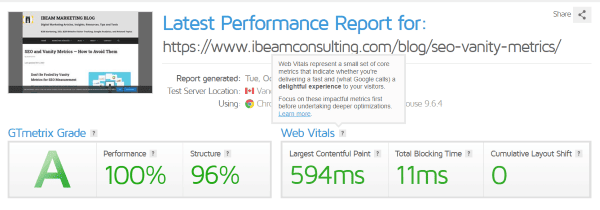
Google also looks at a small handful of user experience metrics called ‘web vitals’ or ‘core web vitals’.
Tools like PageSpeed Insights (PSI) and GTmetrix provide measurements for these, as in the right side of the GTmetrix screenshot below.
These metrics are not all directly related to hosting, but a slow website host can definitely contribute to sub-par performance scores and web vitals scores that are outside the desired target range.
Page Speed and SEO Auditing Tools
Many of the popular SEO auditing tools now include pagespeed testing and core web vitals assessments at the individual page level or even via bulk pagespeed analysis.
For example, see this screenshot from SEO PowerSuite’s WebSite Auditor application. It includes bulk page performance scores and key speed-related metrics within a comprehensive website SEO audit analysis.

Some page speed problems and their potential negative SEO effects can be website hosting-related. However, many other non-hosting issues can result in slow page loading times as well.
Good website auditing tools can help you identify all important SEO problem areas.
Load Balancing
For larger websites with high traffic, consider hosting solutions that offer load balancing to distribute traffic efficiently and ensure optimal performance.
For SEO purposes, this can lead to faster load times, better page speed metrics, and better user experience as a result.
Server Uptime and Reliability
Unexpected downtime or server outages can negatively impact your website’s SEO. When your website is inaccessible, search engines have difficulty crawling and indexing your content.
Look for a hosting provider with a high uptime guarantee to ensure your website is consistently available.
Website Downtime and SEO — Quick Case Study
I have had firsthand experience with the impact of website downtime on SEO.
I was traveling on vacation in late summer and failed to quickly notice a website outage that lasted a few days. Terrible timing for a website problem!
As a result, Google (via its Googlebot crawlers) couldn’t crawl my site. This ended up causing my Google search visibility to plummet for several weeks for a few key pages.
(Interestingly, the major negative impact was for desktop-based search on Google. Mobile search visibility was affected only a little during this period.)
Here’s what that looked like in Google Search Console for a specific impacted page. The purple line is impressions, orange is average ranking position, and blue is click activity.
Even though I fixed the problem quickly after discovering it, my ‘Google SEO’ for the impacted pages didn’t really recover for about 6 weeks.

I wrote more about this unfortunate state of affairs in this post about how website downtime impacts SEO.
The problem turned out to be an SSL settings issue with Cloudflare (my CDN provider at the time), and not a web server outage. I found the root problem and fixed it remotely from my smartphone.
Lesson learned! Always keep a close eye on business-critical website availability. Consider paying for a good website uptime/downtime monitoring service if the site is truly critical to your business operations.
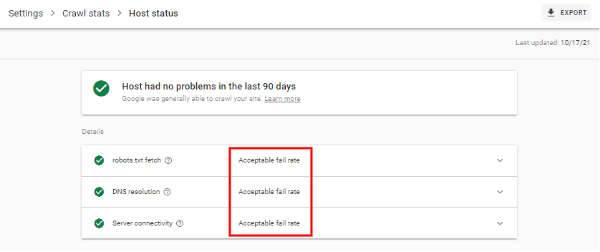
Also, in tools like Google Search Console, keep an eye on your crawl reports to monitor for potential host problems.
Here’s an example:
Related: Learn more here about SEO case studies in general, plus more on SEO tools case studies and user success stories.
Want to stay updated on my SEO-related content? Add your email details below for periodic updates straight from me (David).
Your email info is safe here. We don’t sell, rent, or share your details with outside parties. You can easily unsubscribe at any time.
Security and SSL Certificates
Website security is a crucial SEO consideration. Search engines favor secure websites that use HTTPS encryption.
Hosting providers that offer free SSL certificates (such as ‘Let’s Encrypt’) and robust security features can help improve your website’s SEO by providing a secure browsing experience for users.
Also, if your website is hacked or infected with malware, it can be penalized by Google and other search engines. A good web hosting provider will offer security features to help protect your website.
Make sure that your web hosting provider offers security features such as SSL certificates, malware scanning, and intrusion detection.
Google Search Console will also tell you if it thinks your site is secure. For example, in the HTTPS report as shown below.

And the ‘security issues’ check in Google Search Console.

Server Location and CDN — Content Delivery Network
The geographic location of your hosting server can influence your website’s search engine rankings, particularly for local SEO.
If you have a local audience, hosting your website on a server located near your target audience can provide faster load times and potentially boost local search rankings.
If your target audience is located in a different country than your web server(s), your site may load more slowly for them. This can lead to a worse user experience and lower search rankings.
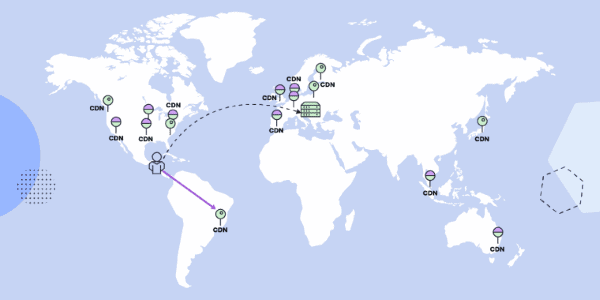
And if your audience is multi-continent or completely global, then a CDN — Content Delivery Network — is a must-have for replicating your website presence to servers that are much closer to your website’s users.
SiteGround has developed their own in-house CDN network, which has both free and paid options for web hosting customers.
Related: Learn more here about SEO and growing global traffic, including related insights and tips.
Scalability and Web Hosting Resources
A hosting provider should offer scalability options that allow you to accommodate increased website traffic and content growth without performance issues.
Choose a plan that provides adequate server resources (CPU, RAM, storage) for your website’s current and foreseeable future needs. Also, make sure there’s a smooth upgrade path that won’t force you to switch hosting providers unless you really need to.
Technical Support and Customer Service
A reliable hosting provider should offer responsive customer support to address technical issues promptly. Downtime or technical problems can harm SEO, cause traffic and revenue losses, and hurt your website/brand reputation.
Related: See my mini case study here on how a website outage can impact SEO.
And a proper shoutout to SiteGround here. Their excellent chat support team helped me out of a jam when I was doing some WordPress plugin updates.
My site went down after one final batch of WordPress plugin updates and the SiteGround team quickly discovered and fixed an htaccess file problem caused by one of the updates. It was a single line of code that needed to be restored, but it made all the difference.
My site was back up and running in minutes. This was a problem I would not have found and fixed myself in any reasonable amount of time.
So thank you, SiteGround support team!
Crawlability and Indexability
Ensure that the hosting environment allows search engine bots to crawl and index your website effectively. Server configurations and settings should not block or hinder search engine access to your content.
Pro Tip: Check your server logs or realtime traffic monitors like Wordfence’s ‘Live Traffic’ option (WordPress security plugin) to make sure the legitimate search engine bots (Googlebot, Bingbot, etc.) can access and crawl your site with no issues.
Content Management System (CMS) Compatibility
If you use a specific CMS, ensure that the hosting provider supports it seamlessly. Compatibility issues can affect your ability to optimize and manage your website effectively.
For self-hosted WordPress users, make sure your website hosting firm gives you the level of WordPress support you truly need — ranging from basic free WordPress installations to more premium ‘managed WordPress’ packages that bundle in various support and maintenance services.

The main impact on SEO here is that any CMS compatibility or support issues may constrain your ability to have a properly optimized site, increase risks of greater downtime issues, user experience problems, etc. None of these are good for SEO.
Website Backup and Recovery
Regular website backups are crucial for disaster recovery and protecting your SEO efforts. A hosting provider should offer automated full-site backup options and easy restoration processes.
Daily backups are especially good if you are publishing new SEO-optimized content every day, or making daily changes and SEO improvements to older content.
That way, you risk losing at most one day’s worth of work on your site.
Note that periodic site backups provided by your website hosting firm are separate from using 3rd-party backup plugins, such as UpdraftPlus for WordPress.
With good web hosting-provided backups in place, you may not even need a separate backup plugin unless it offers other valuable features.
SEO and Website Hosting — Additional Considerations
Other SEO Considerations for Website Hosting
While the points above are the most important SEO-related hosting considerations for most website owners, the areas below are also worth noting.
Website Hosting Changes
Changing your web hosting provider can have a temporary impact on your SEO. Google and other search engines may need some time to crawl and index your website on its new servers.
However, if you choose a good web hosting provider and follow best practices, your SEO should recover quickly from a hosting change.
Website and Data Ownership
Be clear about who owns ‘your’ website and data. Some hosting providers may have restrictions on data ownership, site exportability, etc., which could be a concern at some point when you may want to make a hosting switch.
It’s always best to carefully read your hosting provider’s terms and conditions to make sure you have free and clear rights to your entire website structure and content.
Want to stay updated on my SEO-related content? Add your email details below for periodic updates straight from me (David).
Your email info is safe here. We don’t sell, rent, or share your details with outside parties. You can easily unsubscribe at any time.
Like this post? Quickly share it with your social networks here.
SEO and Website Hosting Considerations — Closing Thoughts
Keep SEO in Mind When Picking a Website Host
Decisions about the best website hosting options for your web presence will bring many factors into play.
There’s overall monthly or annual cost of course, but also things like server types, hosting infrastructure, speed, reliability, backups, technical support, specific CMS support, and others.
As discussed above, some areas of website hosting can have important SEO implications, too. If your traffic acquisition and growth plans rely on organic search channels, you’ll want to pay close attention to these areas.
A quality website hosting firm will ‘have your back’ in these SEO areas, putting you in a good position to focus on the website itself and deliver the great content and user experience your target audience wants and expects.
In short, when selecting a website hosting provider, it’s essential to balance cost considerations with the need for quality service and support.
Conduct thorough research, read reviews, and consider the specific needs of your website to choose a hosting provider that aligns with your SEO goals and overall business objectives.
Questions or Comments?
I hope this discussion of website hosting and related SEO implications has been helpful!
- How much do SEO considerations factor into your website hosting and infrastructure decisions?
- Have you ever experienced SEO performance problems attributable to the hosting platform or environment?
- From an SEO improvement perspective, what (if anything) would you change about your hosting environment today?
Feel free to add more in the comments below with any thoughts, feedback, or related questions. Thanks also for any social shares on this post!
