
Last updated Apr 16, 2025
How to Check Your WordPress Image Optimization for SEO
Good image SEO is an important part of overall website optimization for better search performance.
For WordPress websites in particular, there are several ways to conduct a good image SEO audit — looking specifically at the image optimization aspects of a WordPress site.
This post looks at several WordPress image SEO audit areas, including insights, tips, and a few tools that can help.
Let’s take a closer look below…

This post contains referral links to select vendor partners. We may receive compensation for purchases made via these links, at no additional cost to buyers.
WordPress Image SEO Audit Checkup
Finding SEO Problems with WordPress Images
WordPress is often considered to be a pretty SEO-friendly content management system (CMS) ‘right out of the box’, as the saying goes. And with a few good SEO-focused plugins added and used properly, this claim gets even stronger.

However, WordPress SEO is not an ‘install it and forget it’ kind of proposition.
This is also true for WordPress image SEO — the optimization of image content present on a WordPress website or blog.
Many WordPress sites have significant image SEO problems.
The causes can be many and include a lack of SEO awareness or concern, technical mistakes or accidents, or even just plain laziness on the part of the website owners, admins, and content producers.
See the sections below to identify and start fixing WordPress image SEO problems for your company website, SEO client sites, or your personal/hobby websites and blogs.
Related: See this brief checklist of image SEO best practices. It summarizes many of the key points below.
Quick Checks for WordPress Image Optimization
Review Key WordPress Areas for Image SEO Issues
For WordPress websites, there are several important areas to check for potential image SEO issues and opportunities for improvements. These are easy to check just by ‘manual inspection’ and require no special SEO tools.
Here are the important areas I make sure to review carefully when performing a WordPress image SEO audit.
WordPress Media Library Review — Image SEO Factors
You can tell a great deal about how a WordPress website or blog uses images just by doing a manual review of the WordPress media library.
It’s one of the first things I do when performing a WordPress image SEO audit. You’ll find many telltale indicators here about how much (or how little) attention has been paid to image optimization.
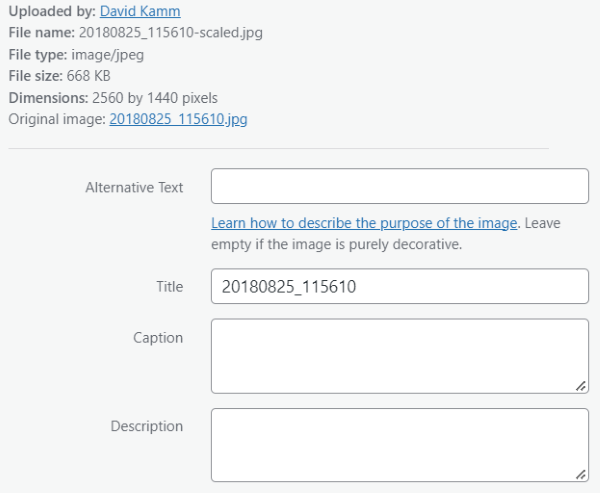
Relating to image optimization, here are the top things I look for inside the WordPress media library.
Image File Types
Check the image file types used within the WP media library. You’ll probably see lots of jpeg (or jpg), png, or gif file extensions. JPEGs are widely used for photographs, while PNGs are better for graphics and illustrations.
These are very common image formats for WordPress sites. They’re fine as long as the file sizes and dimensions are also OK (see more below).
If you also see more modern and efficient image formats like WebP, that’s a very good sign that the website has some image SEO considerations already in place. WebP files are smaller than jpeg versions of the same image, which makes for faster image loading times.

Image File Size (as in KB file size)
This is the big one for page speed purposes, meaning faster image and page loading times. Your users, Google, and other search engines will see and appreciate this.
Look at the image file sizes inside the WordPress media library.
Are they huge, as in multiple hundred KB, or even larger (> 1MB)? If so, this is a big red flag. This is a strong sign that they weren’t compressed properly (optimized) before being uploaded to the WordPress media library.
Or are they small, perhaps single-digit KB for logo images and small/simple images, or < 20 KB for others, and < 50 KB or so for larger and more detailed images?
If so, this is a good sign that the images in your WordPress media library are already optimized for size, either before the original upload or by a good image compression plugin.
So, take a close look at the image file sizes as part of your WordPress image SEO audit. The numbers you see here will tell you a lot.
Image Naming
How people name images before uploading them to the WordPress media library is also an image SEO consideration.
The default image filename conventions used by digital cameras and smartphones, for example, are cryptic and unrelated to the actual content or topic of the image.
For WordPress image SEO purposes, it’s a best practice to rename your image files before uploading them to the media library. Use a name that is descriptive and useful for the target purpose.
It’s fine to include an SEO keyword or two (or a good simple variation) if that works naturally.
By inspecting the image filenames used in the WordPress media library, you’ll learn whether this is an image SEO audit concern or not.
Image Dimensions (pixels — width and height)
The actual physical sizing (in pixels) of images in the WordPress media library is another aspect of WordPress image SEO to review.
Modern digital cameras (including smartphones) take images that are far larger in pixel dimensions than most websites need. So it’s a good idea to resize images to more practical ‘width x height’ image dimensions before uploading them to WordPress.
For example, on this blog I use images that are 600 pixels max width. So I don’t need or want to upload images that are any wider than that.
I simply resize them and maintain the original aspect ratio while doing so. I use the standard Windows image editing app to do this — no fancy tools or Photoshop required.
Pro Tip: The default maximum image pixel size you can upload to WordPress is 2560 pixels. That’s another good reason to downsize your high-megapixel original images before uploading them to the WP media library. Resize pixel dimensions first, then compress the image to reduce file size even further.
Image Alt Text
Image alt text is the text string that briefly describes the image for screen readers, etc., or if the image doesn’t load properly for some reason.
It’s also useful for image SEO purposes, especially if there’s a good opportunity to use a target keyword or two in the alt text field.
When checking images inside the WordPress media library, check the ‘alt text’ field to see what’s there. Is it completely empty for most or all images? Or is it SEO-friendly descriptive text?
If empty, this is a key indicator that the WordPress images have not been optimized for SEO or for assistive technologies like screen readers.
Pro Tip: It’s also possible to add or edit image alt text within various ‘image blocks’ when using the WordPress Gutenberg editor. This is great for tweaking the alt text to suit the context of specific image placements.
Image Captions
Like image alt text, default image captions may also be evident inside the WordPress media library.
It’s less common to see this level of detail added to images inside a media library. But if good image captions are already in place, it’s another sign that the images may have some extra SEO value already.
Image captions, by the way, are another element that can be added on a per-instance basis to suit the needs (and SEO focus) of a particular piece of content.
I typically do not add image captions inside the media library. Instead, I add custom image captions as needed to suit the content, context, and SEO focus of the page or post I’m building or updating.
Image Optimization Plugins
Early on when auditing a WordPress website for image SEO issues, take a look at the set of plugins already included in the WordPress installation.
Do you see a dedicated image compression plugin, such as Smush, ShortPixel, or any others in that category?

If so, check the plugin settings to make sure they are actually being used properly.
If the images in the media library are already ‘small’ or appear to be optimized (see above), that’s a good sign that any image compression plugins are configured and working well.
General SEO Plugins
General-purpose SEO plugins for WordPress have some image SEO features as well.
For example, the Yoast SEO plugin will tell you if you’re missing focus keywords in the alt text fields of images on any page or post you’re working on.

This is a good reminder to always check your image alt text for useful keywords. Don’t overdo it — just sprinkle in some content-relevant keywords where it makes sense.
Caching Plugins
WordPress caching plugins may include options to compress images if they haven’t been compressed elsewhere.
For example, the SiteGround Optimizer plugin includes image compression as well as image ‘lazy loading’ to help further boost page speeds.
Just be careful about doing redundant image compression. If you’re using a dedicated image compression plugin already, you don’t need to also enable it in a caching plugin.
CDNs and Image CDNs
Using a CDN, or Content Delivery Network, is a great way to make your content load faster for visitors located around the world — often far away from your origin hosting server.
If the WordPress site you’re auditing or reviewing has a CDN active already, that’s a good sign for image optimization. The site’s image content (and other page content) is being delivered faster for geographically dispersed users.
An image CDN is a specialized CDN that is specific to image optimization and speedy delivery of image content.
If a WordPress site has an image CDN already connected, that’s another strong indicator of good image SEO.
Image Placement and Content Relevance
While performing a WordPress image SEO audit, check several of the most important or typical site pages and blog posts to see how the images (from the media library) are actually being used ‘in real life’ on the site.
Look for these things:
- Image placements — Are the images being placed appropriately on the page or post, supporting content nearby?
- Image dimensions — Are the images included at full size (as uploaded), in standard WordPress thumbnail sizes, or are they being scaled dynamically at load time (50%, 75%, etc.)? (Dynamic scaling is not ideal for page speed.)
- Image alt text and captions — As discussed above, do all images have SEO-friendly alt text included? Do they have captions underneath that will also help readers and Google understand the purpose and context of the images?
- Too few or too many images — Do pages have too little or too much image content relative to everything else on the page? Do you see ‘giant walls of text’ pages that could benefit from a few image placements? Do you see pages that seem image-heavy and that could use more related text to boost SEO value?
- Image galleries, sliders, etc. — Do pages and posts have image galleries or image sliders? If so, check the settings for these to make sure they’re delivering maximum SEO value and aren’t adding too much ‘image bloat’ to the content.
WordPress Images & Technical Site Audits
WordPress Image SEO and Technical Website Auditing Tools
Like any website, a WordPress site or blog can be fully audited using modern technical site auditing tools. Within the comprehensive audit results, there will be image-specific SEO analysis and results as well.
Technical Website Auditing Tools
Regarding image SEO issues, a good technical website audit will identify things like:
- Overly large image files (individual images)
- Overly large pages (often due to image content bloat)
- Missing image alt text
- Page speed issues (often due in part to slow-loading images)
- Broken images (e.g., not loading properly)
Within the audit report, sorting pages by total page size (descending order) is helpful for finding image bloat issues.
Also, sorting image resources by file size (descending order) can quickly pinpoint images that could benefit from better compression, smaller pixel dimensions, etc.
Some of these problem areas will be apparent during a manual walk-through of the WordPress media library. However, it’s also useful to confirm these issues by looking specifically at image-related SEO problems and opportunities noted in technical website audits.
Learn more about good website auditing tools here.
I personally have been using the WebSite Auditor application in SEO PowerSuite. It’s a powerful site auditing tool that provides useful image SEO insights as well.

Page Loading Speeds (Image Load Times)
This area is not specific to WordPress websites but is worth including here in any case.
When website pages load slowly, users aren’t happy and Google may get a bit grumpy as well — giving your page a small ‘negative’ in that area for ranking purposes.
The culprit may be overly bulky and bloated WordPress image content.
A good way to test for this is to run simple free website page speed testing tools on a few of your most important pages and posts — especially those with several images included.
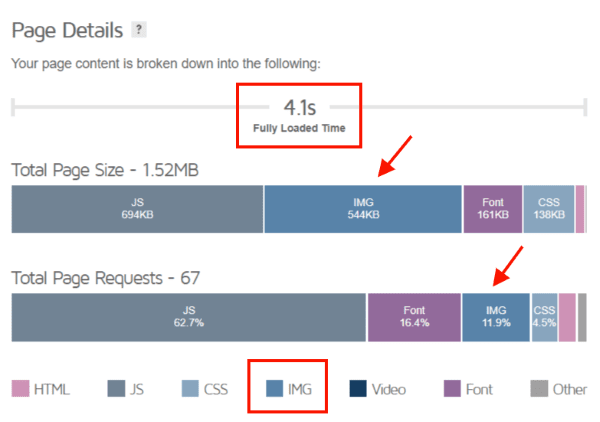
Google’s PageSpeed Insights (PSI), and also GTmetrix and others, are great for this purpose and will help you identify overly-large image content.

Want to stay updated on my SEO-related content? Add your email details below for periodic updates straight from me (David).
Your email info is safe here. We don’t sell, rent, or share your details with outside parties. You can easily unsubscribe at any time.
Like this post? Quickly share it with your social networks here.
WordPress Image SEO Audits — Closing Thoughts
Basic WordPress SEO for Images is Pretty Straightforward
Once you know where to look (and what to look for) in WordPress, image SEO becomes a much less daunting task.
Good image SEO practices and habits for WordPress should pay off in terms of better SEO performance, faster page loading times, and happier human users as well.
Image SEO analysis and audits are also appropriate when working on content optimization tasks and periodic content updates.
As I covered above, there are image SEO audit checks you can do directly within your WordPress admin environment. And, there are image-specific checks and analyses you can perform with help from external site-auditing tools.
Once you’ve performed a comprehensive WordPress image SEO audit, you can then prioritize areas for ‘quick SEO fixes’ and other more involved tasks that may take more time and effort.
Then, once you’ve internalized what goes into good image SEO, you can incorporate the most important elements into your WordPress content production and maintenance workflows.
Questions or Comments?
I hope this introduction to WordPress image SEO audits has been helpful. Here are some related questions for you:
- How is your WordPress site or blog doing in the area of image SEO?
- What tactics, plugins, and/or tools do you use to make your WordPress images as SEO-friendly as possible?
Feel free to add more in the comments below with any thoughts, feedback, or related questions. Thanks also for any social shares on this post via the buttons below!
