
Connecting AI Platforms to Your SEO Data
What if you could use conversational AI to “talk” to all the SEO data held captive in your favorite SEO platforms?
Well, now you can essentially do that, thanks to something called the Model Context Protocol, or MCP.
This post explores how popular SEO tools support MCP to easily bridge the worlds of AI and SEO/GEO.
Let’s dive in and take a closer look below!
This post contains a few referral links to select vendor partners. We may receive compensation for purchases made through these links, at no additional cost to the buyer.
Last updated Aug 27, 2026
SEO Tools & the Model Context Protocol (MCP)
Introduction: The Shift from SEO Dashboards to AI Agents
For over a decade, the daily routine of an SEO professional followed a predictable pattern: log into a dashboard, export three different CSV files, open a massive spreadsheet, and manually cross-reference metrics to spot trends.
Whether you were conducting technical audits, analyzing competitor backlink profiles, or tracking keyword rankings, the heaviest lift was almost always gathering and formatting data across fragmented software tools.
That workflow is undergoing a profound transformation. Modern AI assistants – including Anthropic Claude, OpenAI ChatGPT, Google Gemini, Perplexity, and Cursor – are no longer just conversational text generators.
They are rapidly evolving into active research agents. Instead of forcing you to hunt down data manually and paste it into a prompt, AI models can now query live databases, run technical checks, and analyze search results directly within your workspace.
At the center of this shift is the Model Context Protocol.
Built as an open standard, MCP is quietly rewriting the rules of search engine marketing by creating a universal connection between AI interfaces and live SEO software.
In this guide, we will break down what the Model Context Protocol actually is, why major SEO platforms are adopting it so aggressively, and how both established suites and emerging tools support MCP today.
MCP Basics & SEO Context
What is the Model Context Protocol and Why Was It Developed?
Introduced as an open standard by Anthropic in late 2024, the Model Context Protocol was created to solve a fundamental limitation of Large Language Models: AI models are isolated from real-time external data unless specific, custom connections are built for them.
The Integration Bottleneck MCP Solved
To understand why MCP matters for search engine optimization, consider how software integrations used to work.
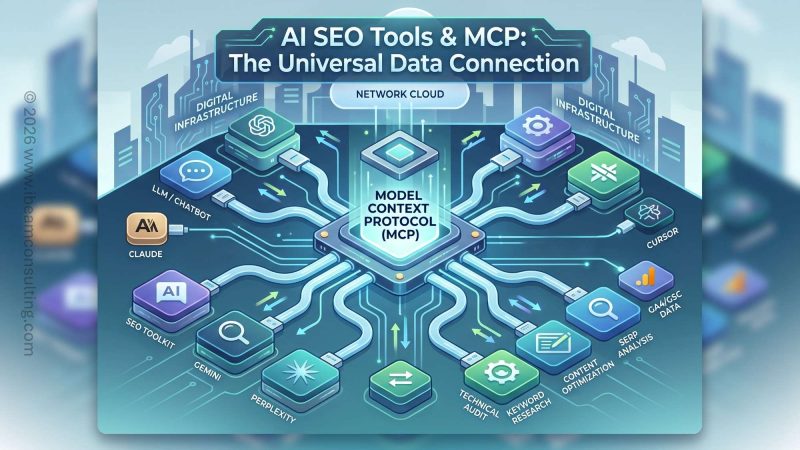
If five major AI assistants (such as Claude, ChatGPT, Google Gemini, Perplexity, and Cursor) wanted to interact with ten different SEO software platforms, developers had to build and maintain fifty separate, custom integrations.
Every time an API endpoint changed, existing connections broke. Smaller software vendors were often left out completely because engineering teams lacked the bandwidth to build custom connectors for every new AI interface.
This created a severe integration bottleneck. MCP solved this by establishing a single, open standard. Think of MCP as the “universal USB-C cable” for artificial intelligence.
Instead of building unique connections for every combination of AI client and software tool, developers create one MCP server for their platform. Once created, any MCP-compatible AI assistant can connect to that tool instantly.
How MCP Works in Simple Terms
The architecture relies on three primary components working together seamlessly:
- The MCP Host or Client: This is the AI interface you talk to, such as Claude Desktop, ChatGPT, Google Gemini, Perplexity, or developer tools like Cursor.
- The MCP Server: This is a translator or bridge hosted by an SEO platform (or run locally on your computer) that converts the AI assistant’s requests into commands its database understands.
- The Workflow Loop: When you ask a question like “Which of my pages have high search impressions but a click-through rate under 1%?”, your AI host recognizes that it needs real-time data. It sends a request to the appropriate MCP server, which queries the provider’s API, returns the raw data, and lets the AI synthesize actionable insights for you in seconds.
By eliminating manual exports and custom developer scripts, MCP turns static SEO platforms into interactive extensions of your favorite AI workspace.
Here’s a brief video that highlights connecting ChatGPT directly to the Keywords Everywhere platform via MCP.
How and Why SEO Tools Support MCP Today
SEO Data Connectivity & Exploration: An Ideal MCP Use Case
Search engine optimization was arguably the single most qualified industry for rapid MCP adoption. Unlike creative writing or general brainstorming, SEO is inherently grounded in multi-variable quantitative data.
A single optimization decision often requires looking at keyword search volume, keyword difficulty, domain rating, backlink velocity, historical rankings, and indexation status simultaneously.
Overcoming Context-Switching Friction
Before MCP support, an SEO strategist performing a competitive content analysis had to cycle continuously between multiple specialized tools.
You might start in Google Search Console to view existing impressions, move to a backlink checker to inspect domain authority, jump over to a rank tracker to evaluate keyword difficulty, and finally paste all those disparate numbers into an AI workspace like Claude, ChatGPT, or Perplexity to generate recommendations.
This context switching creates friction, burns up staff or agency time, and introduces human error during data copy-pasting.
By connecting these platforms directly to AI clients via MCP, SEO tools allow marketers to run complex, multi-source research tasks in plain English.
Core Capabilities Unlocked by SEO MCP Servers
- Conversational Data Retrieval: Instead of clicking through filters in a dashboard, you can simply ask your AI model, “Show me all pages on my domain that lost more than 20% of organic traffic last month, and cross-reference them with lost backlinks.” The AI calls the relevant MCP endpoints and delivers a clean list instantly.
- Autonomous Research Loops: Rather than completing tasks step-by-step, you can instruct an AI agent to execute end-to-end workflows. For example, an agent running in Cursor, Claude, or ChatGPT can analyze keyword gaps against three competitors, query live SERP data, check keyword difficulty, and generate a fully structured content outline — all within a single session.
- Live SERP & First-Party Data Fusion: MCP endpoints make it effortless to combine owned first-party data (from Google Search Console) with live third-party industry metrics (from tools like Ahrefs, Semrush, or DataForSEO). This provides an AI model with full context before it writes a single word or suggests an optimization strategy.
For marketing agencies and in-house teams, this translates to dozens of hours saved every week on reporting, technical audit preparation, and client pitch preparation, while democratizing access to complex analytical data for non-technical team members.
Related: Also see these posts about vibe-coding your own SEO apps, AI SEO/GEO and prompt cluster tracking, and using Gemini with Google Trends.
SEO Tools with MCP Support
SEO + MCP: Toolkit Vendor Lineup
To help you compare options at a glance, the table below summarizes how major SEO platforms support MCP, their deployment category, primary capability, and whether they charge extra for protocol access.
| Vendor / Tool Name | Category / Type | Key MCP Capability | Extra Charge? |
|---|---|---|---|
| Ahrefs | Enterprise / Cloud | Remote OAuth endpoint for Site Explorer, Keywords Explorer, and Site Audit | No |
| Semrush | Enterprise / Cloud | Official MCP app for Claude & ChatGPT covering domain analytics & keyword research | No |
| SE Ranking | Enterprise / Cloud | Multi-functional remote MCP spanning rank tracking, audits, and AI search visibility | No |
| Mangools | Cloud Suite | Remote server (mcp.mangools.com/mcp) for KWFinder, SERPWatcher, and LinkMiner | No |
| SEO PowerSuite | Desktop Suite | Desktop application; no official remote/cloud MCP server available | N/A |
| Keywords Everywhere | Extension / Pay-As-You-Go | Remote server (mcp.keywordseverywhere.com/mcp) for live volume, CPC, and competition | No |
| DataForSEO | Developer API | Open-source stdio/Docker MCP server for raw SERP, backlink, and keyword data | No |
| GSC / GA4 MCPs (Google) | First-Party / Community | Direct access to indexation, CTR, traffic, and organic impression ground truth | No |
| OpenSEO / ContextBolt / Nightwatch | Emerging Agent-First | Native lightweight connectors for LLM-native SERP tracking and AI search visibility | No |
As the protocol gains traction, SEO tool developers across the spectrum – from enterprise cloud platforms to developer-focused APIs – are rolling out native MCP support.
Here is a quick summary of top options:
Category A: Established Enterprise & Cloud SEO Suites
Ahrefs
- Features: Ahrefs offers a remote OAuth-based MCP endpoint that connects directly to Site Explorer, Keywords Explorer, Site Audit, and Brand Radar APIs.
- Key Benefits: Zero local installation or complex code setup required. You can authenticate directly within your AI assistant to pull backlink profiles, unlinked brand mentions, and organic keyword rankings.
- Extra Charge for MCP? No. MCP access is included in standard paid plans and consumes your existing monthly API units.
Semrush
- Features: Semrush provides official MCP integration for major AI clients including Claude and ChatGPT, offering access to keyword research, domain traffic analytics, and market intelligence.
- Key Benefits: Excellent for high-level market research, domain-vs-domain traffic comparisons, and automated keyword clustering directly in chat.
- Extra Charge for MCP? No. It is included as part of standard account API entitlements.
SE Ranking
- Features: SE Ranking features a multi-functional remote MCP server covering keyword research, rank tracking, technical site audits, and AI search visibility tracking.
- Key Benefits: Delivers a comprehensive suite of tools in a single remote endpoint, making it an excellent all-in-one connector for agencies.
- Extra Charge for MCP? No. Available to account holders using standard subscription API credits.
Mangools
- Features: Mangools provides an official remote MCP server that bridges KWFinder, SERPWatcher, and LinkMiner directly into Claude, ChatGPT, Google Gemini, and Cursor.
- Key Benefits: Extremely user-friendly and approachable. Perfect for freelancers and boutique agencies looking for quick keyword difficulty scores and natural-language SERP breakdowns.
- Extra Charge for MCP? No. Uses your standard Mangools account API token and existing plan credits.
Category B: Desktop-Based SEO Suites
SEO PowerSuite (Rank Tracker, WebSite Auditor, SEO SpyGlass)
- Features & Status: SEO PowerSuite operates as desktop-installed application software. Due to its desktop-first architecture, it currently lacks an official native cloud or remote MCP endpoint.
- Key Takeaway: While desktop tools offer strong local data storage, users wanting to analyze SEO PowerSuite data inside AI agents must manually export reports or write local custom scripts rather than using a plug-and-play MCP server.
- Extra Charge for MCP? N/A. No native official MCP server available.
Category C: Pay-As-You-Go, Extension & Developer APIs
Keywords Everywhere
- Features: Keywords Everywhere hosts an official remote MCP server that exposes live search volume, cost-per-click (CPC), keyword competition, and historical trend data directly to AI hosts like Claude, ChatGPT, Google Gemini, and Cursor.
- Key Benefits: Provides an extremely low barrier to entry. Marketers can query accurate search volume and keyword metrics directly inside AI chats without paying for expensive enterprise monthly subscriptions.
- Extra Charge for MCP? No. Uses your existing pay-as-you-go credit balance at the exact same per-keyword rate as their browser extension.
DataForSEO
- Features: DataForSEO provides comprehensive open-source MCP server implementations (supporting standard input/output and Docker) that expose its full suite of SERP, keyword, backlink, and merchant APIs.
- Key Benefits: Maximum flexibility for developers and technical SEOs building custom AI agent pipelines. Offers raw data access with granular pay-per-call pricing.
- Extra Charge for MCP? No. Standard pay-per-call API rates apply; there are no additional protocol surcharges.
Category D: First-Party & Owned Data Connectors (Free / Essential)
Google Search Console & Google Analytics 4 (GSC / GA4 MCPs)
- Features: Open-source and community-hosted MCP servers that connect directly to Google’s official APIs to query indexation statuses, click-through rates, organic impressions, and user conversion data.
- Key Benefits: Provides 100% free, authentic ground-truth data from your own digital properties without relying on third-party estimations.
- Extra Charge for MCP? No. 100% free open-source tooling.
Category E: Emerging Agent-First SEO Tools
OpenSEO / ContextBolt / Nightwatch
- Features: Purpose-built for LLM-native workflows, these emerging tools feature lightweight native MCP connections that blend live rank tracking, Search Console reads, and AI search visibility metrics.
- Key Benefits: Designed specifically for agentic execution rather than static dashboard viewing, offering lean interfaces and affordable flat-rate plans.
- Extra Charge for MCP? No. Native MCP connectivity is included in base monthly subscriptions.
Tips for Using SEO MCPs
Practical Considerations & Best Practices
While integrating MCP servers into your AI workflow can feel transformative, maximizing their effectiveness requires adopting a few strategic habits.
Managing API Units and Credit Consumption
When an AI assistant operates in an autonomous agent mode, it may make multiple API calls behind the scenes to fulfill a single prompt.
If your request is overly broad – such as “analyze all keywords for my domain” – the AI host might attempt to retrieve thousands of data rows through the MCP server, rapidly depleting your monthly API units or pay-as-you-go credits.
- Best Practice: Keep prompts targeted and specific. Instead of asking for “all backlink data,” specify limits like “Find the top 10 highest Domain Rating pages linking to us that lost their link last month.”
Remote (OAuth) vs. Local (stdio) Configurations
MCP servers typically come in two implementation styles:
- Remote MCP Servers (OAuth): Offered by web-based platforms like Ahrefs, Mangools, and Keywords Everywhere. These require no local code installation; you simply authenticate via your web browser, making them ideal for non-technical marketers using web or desktop chat interfaces.
- Local MCP Servers (stdio / Docker): Used by developer-friendly APIs like DataForSEO or custom Google Search Console builds. These run directly on your machine or server. They offer complete control over privacy and environment variables, making them popular for custom AI pipelines built in Cursor or VS Code.
Avoiding Tool Sprawl and Context Overload
It can be tempting to connect dozens of MCP servers to your AI assistant simultaneously. However, giving an AI host access to too many tools at once can confuse its tool-selection reasoning, leading to slower responses or incorrect API calls.
- Best Practice: Enable only the MCP servers relevant to your current task. If you are conducting keyword research, connect your Google Search Console and Keywords Everywhere or Mangools servers, while keeping unrelated tools disabled.
Like this post? Quickly share it with your social networks here.
Want to make sure you never miss our updates? Click below to add us as a preferred source on Google Search.

AI SEO Tools & MCP Features — Closing Thoughts
The Future of Agent-First SEO
The search marketing industry is witnessing a monumental transition. For decades, SEO software competed primarily on the visual polish of its dashboards and the depth of its static reporting tables.
With the rapid adoption of the Model Context Protocol, the focus is shifting from static data presentation to conversational, AI agent-driven execution.
SEO data is leaving the isolation of web browser tabs and moving directly into the spaces where content strategy, technical analysis, and execution actually happen.
Whether you rely on enterprise platforms like Ahrefs and Semrush, affordable pay-as-you-go solutions like Keywords Everywhere, or open-source connectors for Google Search Console, adding an MCP server to your AI assistant is one of the easiest ways to upgrade your digital marketing workflow.
Next Step: Pick one SEO tool you use daily – whether it’s Google Search Console, Ahrefs, Semrush, Mangools, SE Ranking, Keywords Everywhere, or something else – and connect its MCP endpoint to your preferred AI workspace today.
Experience firsthand how conversational data access can transform your search strategy!
Questions or Comments?
I hope this brief overview of the Model Context Protocol in an SEO tools context has been helpful! Let’s close below with a few related questions for you:
- Based on your current knowledge of AI LLMs and the MCP protocol, where do you see MCP helping your SEO/GEO strategy in the near future? Or are you using it already?
- Which parts of your current SEO tech stack support MCP today? Which platform will give you the most MCP-related value?
- What are the “quick win” scenarios for you when combining LLMs, MCP, and your favorite SEO tools? What can you get started on this week or month?
Feel free to add more in the comments below with any thoughts, feedback, or related questions. Thanks also for any social shares on this post!

MCP support sounds like a practical way to make SEO platform data accessible through conversational AI instead of jumping between dashboards. I’m especially interested in how reliably it can translate natural-language questions into useful keyword and technical SEO insights.