
Use AI for Faster & Easier WordPress Site Maintenance
If you own or manage a typical WordPress website, you know it’s not a “set it and forget it” situation. This is especially true for larger and more content-heavy sites.
With AI capabilities, features, and tools now becoming mainstream, the promise of using AI for better and faster WordPress site management is turning into reality.
This post provides an overview of AI-based WordPress website management and maintenance, with insights, tips, and tools for making major gains in this area.
Let’s dive right in and take a closer look below!
This post contains a few referral links to select vendor partners. We may receive compensation for purchases made through these links, at no additional cost to the buyer.
Last updated Oct 19, 2026
AI & WordPress Site Management
Introduction: The New Reality of WordPress Site Ownership
If you’ve managed a WordPress site for more than a few weeks, you know the drill.
You log in with the humble intention of publishing a quick blog post or tweaking a client’s contact form.
But the moment the admin dashboard loads, you’re greeted by a familiar wall of alerts: five plugins desperately need updates, a database notification warns you of unoptimized tables, your media library is bloated with unlabeled images, and an unexpected PHP notice is quietly corrupting your staging environment.
Before you know it, an entire Tuesday afternoon has vanished into the administrative abyss of WordPress site maintenance.
For years, “running WordPress” has meant walking a tightrope between creative strategy and endless digital janitorial work.

When artificial intelligence first showed up in the web ecosystem, many wrote it off as little more than a parlor trick — a separate browser tab running ChatGPT where you could churn out generic, slightly hollow blog drafts.
But that era is officially over. Things are changing fast.
Today, AI has migrated out of isolated chat windows and embedded itself directly into the native machinery of the WordPress stack. We are witnessing a profound shift: AI is no longer just a content generator; it has evolved into an active, intelligent co-pilot for day-to-day WordPress site operations.
The promise here isn’t about handing over your business to an algorithm or replacing human taste and judgment. It’s about eliminating the repetitive, soul-crushing friction that keeps designers, website admins, and agency owners from doing their best work.
In this guide, we’re going to walk through what modern AI-driven WordPress management actually looks like on the ground.
We will explore how routine maintenance is running on autopilot, examine how hosting environments and page builders are natively adapting, dive into smarter content governance and semantic SEO, and peek around the corner at game-changing agentic tools like the Model Context Protocol (MCP).
Let’s dive into how the modern WordPress stack is running itself — so you don’t have to go it alone.
AI-Powered WordPress Maintenance
The Core Shift: Everyday Maintenance & Operations on Autopilot
Ask any agency lead or solo webmaster what they dread most about their weekly WordPress care plans, and they will almost certainly point to maintenance routines.
Keeping a site healthy requires constant attention, and the margin for error is razor-thin: one bad plugin update can break your checkout flow, spike server latency, or tank your SEO rankings overnight.
AI is fundamentally restructuring this maintenance baseline from a reactive scramble into an automated, predictive routine.
Intelligent Updates & Safe Upgrades
The dreaded “White Screen of Death” may be rarer in modern versions of WordPress, but subtle visual breakage remains an everyday hazard.
A minor CSS update from a slider plugin can easily push your main navigation off-screen on mobile devices without throwing a single fatal server error.
To combat this, modern management suites now incorporate automated visual regression testing. Instead of an admin clicking through dozens of pages post-update to see if anything looks off, an AI-powered engine takes headless browser snapshots before and after an update runs, calculates pixel diffs, and flags layout shifts.
If the cart button shifts by 40 pixels or the hero typography collapses into an unreadable column, the system identifies the regression, aborts the deployment, and rolls back the site automatically.
Platforms like WP Umbrella have made safe updates standard practice by automatically taking before-and-after snapshots during plugin upgrades, rolling back instantly if visual anomalies appear.
Similarly, multi-site management dashboards like ManageWP and dedicated visual monitors like Visualping help agencies automate regression checks across hundreds of client endpoints without human eyes inspecting every screen manually.
Beyond visual checks, AI tools are beginning to perform predictive conflict detection.
By analyzing changelogs, open issue trackers, and millions of aggregate update telemetry events – the anonymized diagnostic and error reports shared across host networks – AI can assess the risk of a core or plugin upgrade before you click “Update Now.”
If a particular combination of PHP 8.2, a specific caching plugin, and WooCommerce version updates has caused fatal conflicts elsewhere, your dashboard warns you ahead of time.
Security & Log Intelligence
Server error logs are notoriously dense, filled with truncated stack traces, cryptic warning codes, and thousands of lines of noise.
For non-developers – and even for experienced engineers under time pressure – troubleshooting an ambiguous 500 Internal Server Error can feel like reading tea leaves.
AI-driven log analysis tools are turning that chore into a conversation. Rather than dumping raw .log files into your lap, intelligent security layers parse the background diagnostic data and error signals, presenting a clear, human-readable triage summary:
“Notice: At 2:14 PM, the plugin ‘EventCalendar’ attempted to call a deprecated database function discontinued in your current PHP version. The site remained online, but checkout pages experienced a 1.2s delay. Recommendation: Disable legacy recurring events or update to version 3.4.1.”
Modern security suites are taking this intelligence even further. Specialized platforms like Patchstack leverage machine-learning threat intelligence to scan your specific plugin roster against emerging vulnerabilities, applying automated “virtual patches” at the firewall level before an official plugin patch is even released.
Meanwhile, plugins like MalCare and BlogVault use deep behavioral scanning rather than simple file-signature matching, identifying zero-day bot floods and malicious database injection attempts before they overwhelm your server resources.
Media Hygiene & Accessibility Compliance
Every healthy WordPress site eventually faces media clutter. Content creators frequently upload uncompressed 12MB PNG files straight from a digital camera, completely forgetting to add alt text or organize file names.
This isn’t just an issue of disk space; it is a major barrier to web accessibility and search engine visibility. Under WCAG (Web Content Accessibility Guidelines) and ADA compliance frameworks, accurate descriptive alt text is a strict requirement.
Instead of forcing teams to backfill hundreds of empty alt-text fields manually, vision-enabled AI models integrated into the media library can now scan uploaded imagery, interpret the relevant context of the surrounding post, and generate natural, descriptive alt text instantly.
At the same time, automated asset pipelines convert images on the fly into lightweight modern formats (like WebP or AVIF), resizing and compressing assets dynamically so your Core Web Vitals stay green.
Proactive Site Health Monitoring
Traditional uptime monitors only tell you when a site is completely down. But in the real world, sites rarely fail cleanly; they degrade gradually.
AI-assisted site health monitors observe ongoing patterns across your database queries, response times, and third-party API dependencies.
If an un-indexed query starts causing slow database locks every time a user visits the shop archive, or if your Cumulative Layout Shift (CLS) score starts sliding on specific category pages, the system catches the anomaly early.
Instead of waiting for an angry client email or a dip in search impressions, you get a proactive notification detailing the exact bottleneck and how to fix it before your visitors ever notice a hiccup.
Using AI at Multiple WordPress Website “Layers”
The Foundational Stack: How Core WordPress Layers Are Integrating AI
When we look under the hood of a WordPress installation, it isn’t a single monolith. It’s an ecosystem of distinct architectural tiers working in tandem: hosting environments, visual design engines, themes, and custom code layers.
What makes the current moment so fascinating is that AI isn’t simply sitting on top as a third-party add-on; every single one of these foundational layers is baking machine intelligence directly into its product DNA.
Layer 1: Managed WordPress Hosting
Hosting companies used to compete strictly on server hardware specs, disk quotas, and data center locations. Today, the competitive battleground has moved upstream to intelligent site orchestration.
Modern managed hosts are wiring AI agents directly into real-time server performance and health metrics.
Instead of opening a support ticket and waiting an hour for a tier-1 agent to grep an Apache access log, platforms like Hostinger have rolled out built-in AI assistants capable of parsing configuration errors, running automated migrations, and suggesting database optimizations with one click.
Meanwhile, SiteGround has stepped aggressively into agentic site management with its native AI Agent for WordPress and AI Studio. Rather than forcing admins to click through dozens of wp-admin menus, SiteGround’s hosting-level agent operates directly across connected sites via natural language chat.
Admins can prompt the agent to audit and update plugins, adjust core settings (like permalinks and timezones), manage user roles, and even execute portfolio-wide maintenance across multiple client installs in a single command. It bridges the gap between infrastructure provider and hands-on site administrator.
On the enterprise side, platforms like WP Engine and Kinsta use machine learning models across their edge networks for dynamic routing and smart caching.
By analyzing traffic spikes and bot behaviors in real time, these platforms automatically adjust caching rules and preemptively block malicious traffic clusters before they ever touch your origin server.
Even diagnostics are turning conversational: intelligent assistants inside hosting dashboards can analyze slow database queries, correlate them with specific plugin hooks, and explain precisely why your TTFB (Time to First Byte) spiked during yesterday’s flash sale.
Layer 2: Site Builders & Full-Site Editing (FSE)
If you build WordPress sites visually, you’ve likely felt the friction of going from a blank canvas to a functioning wireframe. The visual builder space has embraced AI not merely to generate generic marketing blurbs, but to manipulate the document object model itself.
- Elementor AI: Rather than just dropping placeholder text into a box, Elementor’s AI integration lets designers generate responsive section wireframes from text prompts, generate custom CSS directly on the selected widget, and write custom container queries without opening an external IDE.
- Divi AI: Elegant Themes has embedded AI into Divi’s visual builder to generate entire layouts on the fly, auto-generate contextual imagery matching the site’s aesthetic, and dynamically translate or adjust text length to keep multi-column cards visually balanced across mobile breakpoints.
- Gutenberg & Full-Site Editing: The native WordPress core team and block ecosystem are running active experiments with block-level intelligence. Instead of manually tinkering with dozens of theme JSON parameters and nesting containers, site builders can now use conversational prompts to assemble complex block patterns and template parts tailored to specific site niches.
Layer 3: Themes & Design Systems
One of the hardest parts of standing up a cohesive website is getting typography, spacing, and color theory to play nicely together without endless micro-adjustments.
Tools emerging out of the theme ecosystem are solving this upfront. ZipWP (developed by Brainstorm Force, the team behind the wildly popular Astra theme) allows creators to describe a client’s business in plain English.
Within ninety seconds, it orchestrates a complete, tailored WordPress site: complete with appropriate design tokens, cohesive color schemes, accessible typography scales, and pre-configured core pages.
Similarly, Kadence AI builds dynamic design libraries directly into your WordPress dashboard. When you initialize a project, it creates pre-styled block patterns that inherit your brand’s specific color hierarchy and tone, guaranteeing that every landing page or case study you spin up later matches the primary design system out of the box.
Layer 4: Developer Tools & Custom Code Snippets
Historically, whenever site administrators needed a minor tweak – like renaming the WooCommerce “Add to Cart” button for out-of-stock items, or creating a custom shortcode to display post view counts – they faced a dilemma: install yet another heavy, bloated plugin, or risk breaking the functions.php file.
AI code assistants built specifically for WordPress have shattered that dilemma.
- CodeWP: Unlike generic code generators that frequently hallucinate non-existent PHP functions, CodeWP is trained specifically on the WordPress core codebase, WooCommerce hooks, and popular plugin APIs like Advanced Custom Fields (ACF) and Gravity Forms. It outputs sanitized, modular PHP and JavaScript snippets that adhere to WordPress coding standards.
- WPCode: As the leading code snippet management plugin for WordPress, WPCode has embedded AI directly into its code editor. Site owners can type a request like “Disable the block editor only on WooCommerce product pages and add an order notice to customer account tabs,” and the AI will draft, comment, and validate the PHP snippet right inside the dashboard.
The net result? Admins can now run leaner, faster WordPress sites using lightweight, custom code snippets while bypassing the bloat of unnecessary plugins entirely.
AI for WordPress Content & E-Commerce
Content & Commerce Operations: Smarter Creation, Auditing, and Catalog Care
Most initial conversations about AI and WordPress revolved around one simple prompt: “Write me a 1,000-word blog post about digital marketing trends and opportunities.”
While generative drafting certainly has its place, experienced site owners quickly realized that generating raw text is only 10% of the job.
In reality, the true operational bottleneck lies in content governance and catalog management: keeping hundreds of existing posts accurate, maintaining brand consistency across multiple writers, and managing sprawling eCommerce inventories.
AI is transforming WordPress content management from a raw drafting tool into an intelligent governance engine.
Managing Existing Editorial Content (The Silent Time Sink)
For any established site, older content is often both its greatest asset and its largest liability.
Posts written two or three years ago accumulate broken outbound links, outdated statistics, deprecated software recommendations, and declining organic traffic due to content decay.
Auditing this backlog manually is an immense time sink. With AI-assisted auditing workflows, site admins can connect intelligent scanners to their post archives.
These tools review historical posts against current web data, flagging claims that need updating and highlighting articles suffering from search decay.
Furthermore, multi-author editorial teams often struggle with voice consistency.
Instead of a managing editor spending hours rewording guest contributor submissions, AI editing layers can evaluate incoming drafts against a custom style guide, reformatting tone, checking reading levels, and tightening sentence structure before a piece ever moves to the staging review.
Even taxonomy cleanup – the bane of every long-running blog – can be automated. Over time, blogs inevitably develop messy tag archives with dozens of redundant tags (ai-tools, ai-software, artificial-intelligence).
AI taxonomy assistants can analyze post archives, consolidate duplicate categories, prune dead tags, and ensure proper hierarchical organization across your entire archive.
WooCommerce & eCommerce Catalog Operations
Nowhere is the operational grind more obvious than in eCommerce. If you manage a WooCommerce store with 500, 2,000, or 20,000 products, catalog maintenance is a full-time job.
AI is revolutionizing the day-to-day management of WooCommerce stores in several critical areas:
- Bulk Description Generation: Turning raw supplier spreadsheets containing only cryptic SKU numbers, dimensions, and fabric specs into compelling, benefit-driven product copy. AI batch processors can generate unique, SEO-friendly descriptions for hundreds of items simultaneously while strictly preserving technical specifications.
- Smart Attribute Tagging & Categorization: Consistent filtering is crucial for eCommerce conversion rates. AI models can inspect imported catalog items and automatically assign proper attributes (color palettes, materials, fit, sizing tiers) and assign them to the correct nested product categories, ensuring store filters work flawlessly without hours of manual data entry.
- Semantic On-Site Product Discovery: Traditional WordPress site search (
?s=) is notoriously rigid. If a shopper types “lightweight running jacket for rainy spring mornings”, default search algorithms return zero results unless those exact keywords exist verbatim in the product title. AI-driven semantic store search engines (such as Algolia integrations, SearchWP with semantic vector search, or native WooCommerce AI search tools) analyze customer intent, synonyms, and product attributes simultaneously. They connect shoppers to the exact waterproof windbreaker they need, boosting store conversions without requiring endless manual keyword tagging.
- Dynamic Schema Integration: Rich product snippets are vital for appearing in Google Shopping tabs and search carousels. AI plugins can structure and validate comprehensive JSON-LD product schema – including price validity, stock status, and variant attributes – keeping search engines updated as catalog states change.
- Customer Review Sentiment Analysis: Review tabs are goldmines of business intelligence, but few merchants have time to comb through thousands of submissions. AI review processors can parse customer feedback across the entire store, clustering reviews into sentiment buckets. If thirty customers mention that a specific hoodie runs small or that a zipper breaks after two washes, the admin receives an automated operational alert to update the product sizing chart or alert the manufacturer.
Dynamic Content Workflows
Beyond static pages and shop catalogs, day-to-day site administration requires adapting content across multiple formats and languages.
- Nuanced Multilingual Localization: Traditional machine translation plugins often produce literal, robotic phrasing that alienates native speakers. Modern LLM-based translation integrations understand cultural nuance, idioms, and context, providing localized copy that sounds genuinely human while preserving the original layout and shortcode formatting.
- Repurposing on Autopilot: Publishing a major pillar post shouldn’t require an hour of derivative clerical work. Connected AI workflows inside WordPress can automatically extract key takeaways to generate compelling meta descriptions, social media preview cards for Open Graph tags, and concise newsletter summaries ready to sync straight into your email marketing platform.
By taking over the administrative heavy lifting of content maintenance and catalog curation, AI leaves content teams and store owners free to focus on what actually moves the needle: creative strategy, customer relationships, and business growth.
WordPress AI Internal Linking & Content SEO
SEO on Autopilot: Internal Linking & Smarter Optimization
Search engine optimization in WordPress has undergone a massive evolution. In the early days, “doing SEO” meant installing an optimization plugin, typing a concise multi-word “keyphrase” into a target keyword box, and obsessively tweaking your copy until colored SEO “traffic lights” turned green.
Today, search engines understand topic clusters, semantic intent, and entity relationships rather than simple keyword density. Modern WordPress SEO tools have evolved in lockstep, moving away from rudimentary check-boxes and toward intelligent, continuous site-wide optimization.
The Rise of Semantic Internal Linking
Internal links are the bedrock of organic search performance: they distribute PageRank, establish topical authority, and keep visitors exploring your site.
Yet, internal linking is notoriously difficult to manage manually as a content archive grows. Once you have several hundred articles or posts, expecting an editor to remember every relevant past piece when publishing a new post is impossible.
Earlier automated tools attempted to solve this using exact-match keyword replacement. The problem? It produced robotic, unhelpful links.
Every time the word “hosting” appeared on a page, the plugin would blindly link it to a single target URL, regardless of whether the sentence was discussing cloud infrastructure, shared servers, or event hosting.
Modern AI internal link engines have abandoned keyword matching in favor of vector embeddings and semantic mapping.
Sidebar: What are Vector Embeddings?
In plain English, a vector embedding converts a piece of text (like a sentence, paragraph, or entire post) into a long mathematical string of numbers that captures its underlying meaning. Concepts that share similar intent or thematic context sit physically close together in that multi-dimensional mathematical space. That is how an AI knows that an article discussing “server latency” is directly related to a guide on “improving TTFB,” even if the two articles don’t share a single keyword in common.
- How it works: Instead of scanning for static words, the AI scans your entire post database, converts the conceptual meaning of each paragraph into numerical vectors, and builds a comprehensive topical map of your site.
- Natural sentence insertion: When you draft a new article, tools like Link Boss and semantic-upgraded engines like Link Whisper identify the most contextually relevant older posts and craft natural anchor text within complete sentences — often rewriting a small clause so the link feels entirely organic rather than shoved in.
- Topical cluster enforcement: Specialized tools like InLinks take this a step further by building knowledge graphs around your site’s named entities, ensuring that internal PageRank flows deliberately from peripheral supporting articles directly up to your authoritative pillar pages.
The result is a resilient internal link graph that grows stronger with every post published, requiring minutes of editorial oversight rather than hours of spreadsheet cross-referencing.
Related: Learn more in these posts about AI-assisted internal linking tools, visualizing website internal links, and internal link anchor text optimization.
Next-Gen On-Page SEO Workflows
Beyond linking, AI is automating the repetitive micro-tasks of on-page optimization while bringing sophisticated entity analysis directly into the WordPress block editor.
- Entity Optimization and Search Intent Alignment: Traditional plugins checked if your keyword was in the first paragraph. Modern AI-enabled suites – including Rank Math AI, All in One SEO (AIOSEO), and Yoast AI – evaluate your content against real-time semantic entities. They analyze top-ranking search results to identify missing sub-topics, suggest questions your audience is actively asking, and alert you if your draft fails to satisfy the underlying user intent.
- Automated Schema Markup Generation: Structured data (JSON-LD) is essential for earning rich snippets, review stars, and FAQ drop-downs in search results. Manually building nested schema for complex content types (like courses, recipes, or multi-location businesses) is tedious and error-prone. AI engines can parse your post content on publish, dynamically map the entities, and output perfectly structured schema without requiring you to fill in a dozen custom fields.
- Programmatic Meta Titles and Descriptions: Writing meta descriptions for twenty articles is fine; writing them for a catalog of 1,500 products or blog archives is mind-numbing. Major SEO plugins now allow batch generation of compelling, click-optimized title tags and meta descriptions that adhere strictly to character limits and search intent, complete with built-in variation testing to find the highest-converting angles.
By shifting technical SEO and link architecture to semantic automation, site owners ensure their search visibility compounds over time without getting bogged down in endless manual data entry.
WordPress with MCP & Agentic AI
The Frontier: The Model Context Protocol (MCP) & Agentic WordPress Management
Everything we’ve looked at so far involves AI operating inside specific plugins, themes, or hosting dashboards. You log in to WordPress, open a specific menu, click an AI button, and review the result.
While that’s a significant upgrade over manual labor, it still forces site owners to act as the glue between fragmented dashboards.
The true frontier of AI-driven WordPress management is shifting from isolated in-plugin features to autonomous, agentic orchestration. And the technical standard powering that transition is Anthropic’s open standard: the Model Context Protocol (MCP).
What is MCP in Plain English?
In non-developer terms, MCP is like a universal adapter for artificial intelligence. It has been referred to by many as the “USB-C cable” of AI.
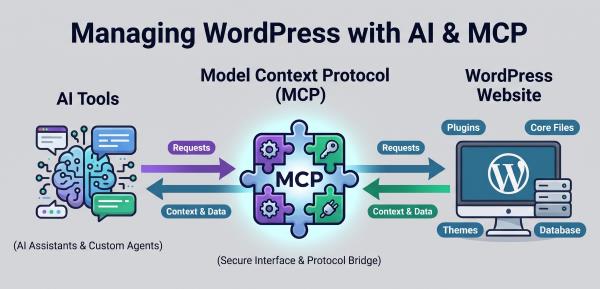
Until recently, an AI model (such as Claude Desktop or a custom LLM runner) was trapped in its chat window. It couldn’t see your staging site, read your database, or run commands on your server unless developers built fragile, custom point-to-point integrations for every single task.
MCP standardizes how an external AI assistant securely connects to external tools, databases, and APIs. Instead of installing twenty different plugins that each talk to AI separately, you can connect your desktop AI environment to an MCP server for WordPress.
Once connected, the AI gains direct, authenticated access to understand your site’s architecture and execute commands on your behalf.
The Technical Plumbing for WordPress
Giving an AI assistant the keys to your website sounds intimidating — and without proper safeguards, it would be. But the architectural plumbing behind WordPress MCP integrations is designed around existing, time-tested security standards:
- Application Passwords & Scoped Permissions: MCP agents don’t store or bypass your primary admin credentials. Instead, they authenticate through WordPress’s native Application Passwords system. This allows site owners to grant granular, revocable access tied to specific user roles.
- The REST API & WP-CLI Integration: An MCP server acts as a translator between natural language prompts and technical commands. It speaks directly to the WordPress REST API (for querying posts, updating taxonomies, and managing media) or executes sanitized WP-CLI (WordPress Command Line Interface) commands on the server (for clearing caches, running database queries, and checking plugin version states).
- Local Staging Sandboxes & The Safe Deployment Loop: For agencies and developers hesitant to let an agent touch production, tools like LocalWP provide an ideal sandbox. You can connect Claude Desktop via MCP to a local staging clone of your client’s site, let the agent perform its tasks, and review the changes locally. Crucially, experienced WordPress admins know that pushing local changes to production isn’t as simple as blindly copying a database file — doing so can overwrite live WooCommerce orders or corrupt serialized PHP data arrays. A safe MCP workflow closes this deployment loop by decoupling code from content: the agent pushes theme or custom code modifications through Git version control (triggering a CI/CD pipeline via GitHub Actions), or leverages host-native staging-to-production push utilities (like those provided by SiteGround, WP Engine, or Kinsta) that selectively merge database rows without endangering transactional customer data.
Why MCP Changes the Paradigm
When AI shifts from a collection of plugins inside the WordPress dashboard to an external orchestration agent, the way you manage websites changes completely.
Instead of opening five browser tabs to manage a routine site upgrade, you issue a single high-level command to your desktop agent:
“Inspect my staging environment. Run minor updates for all active plugins, verify that our visual regression diffs show no layout shifts on mobile or desktop, scan the media library to generate missing alt-text for this week’s uploads, and draft three semantic internal links for the pending product guide. Present me with a diff summary before pushing to production.”
In response, the MCP-powered agent:
- Queries the site via REST API and WP-CLI to audit plugin versions.
- Triggers the updates in a sandbox container.
- Compares screenshot snapshots to confirm zero visual regressions.
- Reads the media library, processes unlabeled images through a vision model, and updates the attachment metadata.
- Scans post embeddings to identify natural internal link anchors in the draft article.
- Presents you with an executive summary in plain English, waiting for your final approval.
This breaks WordPress site ownership completely out of plugin silos. You no longer have to adapt your workflow to the interface of individual tools; instead, an intelligent agent orchestrates the entire operational pipeline across your hosting environment, database, and content archives through unified, conversational command.
Using AI & WordPress Together — A Few Precautions
Operational Realities: Governance, Privacy, and Agency Liability
As exciting as it is to automate routine headaches, handing critical website operations over to artificial intelligence introduces brand-new operational risks.
When an algorithm can write PHP snippets, modify product prices, or deploy updates automatically, the consequences of a mistake aren’t just cosmetic — they can result in downtime, leaked data, or lost revenue.
For solo site owners and client-facing digital agencies alike, implementing AI requires pragmatic governance, clear data boundaries, and well-defined legal guardrails.
Data Privacy & API Boundaries
The first question every site administrator should ask before hooking an AI tool into WordPress is simple: Where is our data actually going?
When you connect an AI plugin or MCP server to WordPress, it often reads site content, customer interaction records, order metadata, and private drafts. You must understand the data retention policies of the underlying models powering those tools:
- Training vs. Zero-Data-Retention: Free consumer AI interfaces (like standard browser chat interfaces) often use submitted prompts to train future models. In contrast, commercial enterprise endpoints (such as OpenAI’s API or Anthropic’s Claude API) generally operate under strict zero-data-retention agreements where your site’s payload is never retained or used for model training. Ensure your plugins and hosting partners route requests through zero-retention commercial endpoints.
- PII & Customer Confidentiality: In WooCommerce stores or membership communities, post and comment databases can contain Personally Identifiable Information (PII) — names, physical addresses, order notes, and email records. Never allow automated tools or vector embeddings engines to index customer transaction tables without strict filtering that strips out PII before data is transmitted over the wire.
- Cost Management and Key Isolation: For agencies managing multiple client sites, avoid using a single global API key across all client installations. If a buggy recurring cron job or rogue translation script gets stuck in an infinite loop on one client’s staging site, it can quickly burn through your entire monthly API budget. Use scoped, per-site API keys with firm usage caps to isolate billing and prevent cost leaks.
- Context Window Bloat & Token Economics: A common pitfall for site managers is piping uncompressed raw data – like an unpruned 50MB
debug.logor a 5,000-row WooCommerce product table – directly into an LLM prompt. Not only will this instantly bump into token context window limits, but it can turn a routine maintenance query into a $30 API call. Pragmatic workflows use smart data chunking and pre-filtering: parsing scripts should feed only the last 50–100 unique error lines to the AI, or query indexed database records in targeted batches rather than passing raw multi-megabyte payloads.
Agency Liability & Quality Assurance
If you run client care plans, you sell peace of mind. Clients pay monthly retainers trusting that someone is watching their back. If an AI tool introduces a broken checkout hook or writes a hallucinated return policy, the agency – not the AI provider – is on the hook for the damage.
To balance automation with accountability, teams should adopt several structural practices:
- Enforce “Human-in-the-Loop” (HITL) Checkpoints: AI should rarely publish directly to production. The most successful agency setups treat AI as an extraordinarily fast junior technician. It can run the tests, gather the logs, draft the internal links, and write the custom snippet — but a human developer or editor must review the diff and click the final “Approve & Deploy” button.
- Revise Care-Plan Agreements & Warranties: Standard web maintenance contracts drafted five years ago did not account for generative code snippets or automated predictive updates. Update your Master Services Agreements (MSAs) and client care plans to transparently outline the use of AI-assisted operational tools, clearly delineating warranties around AI-generated code snippets and third-party API dependencies.
- Audit Trails: When an agent modifies site files or database rows via REST API or WP-CLI, ensure your site logging (via plugins like WP Activity Log) captures the specific user or Application Password responsible. If an anomaly occurs three weeks later, you need a verifiable timeline showing whether an update was triggered by an automated agent or a human editor.
Preparing for Generative Search (GEO / Answer Engine Optimization)
Site management isn’t just about internal maintenance; it’s also about preparing your site for how external AI systems perceive it.
The traditional search landscape is shifting rapidly. Prospective buyers and readers aren’t just clicking traditional blue search engine links; they are receiving synthesized answers directly from conversational answer engines like ChatGPT Search, Perplexity, and Google’s AI Overviews.
Managing a modern WordPress site requires optimizing for Generative Engine Optimization (GEO):
- Frictionless Bot Access: Many legacy security plugins aggressively block AI crawlers by default. While you may want to block aggressive scrapers that scrape content without attribution, blocking answer-engine bots (like PerplexityBot or OAI-SearchBot) can erase your site’s visibility from generative search citations entirely. Review your
robots.txtand firewall rules intentionally.
- Machine-Readable Structure: Generative engines favor clean, authoritative, extractable answers. Sites with well-nested HTML headings (
H2,H3), concise direct summary paragraphs, robust JSON-LD structured data, and clear entity definitions are far more likely to be parsed and credited as primary source citations in synthetic answers.
Like this post? Quickly share it with your social networks here.
Want to make sure you never miss our updates? Click below to add us as a preferred source on Google Search.

Managing WordPress with AI — Closing Thoughts
Conclusion & Actionable Next Steps
We have reached a pivotal inflection point in the two-decade history of WordPress.
The familiar lament – that managing a self-hosted WordPress site requires too much maintenance overhead, too many plugin updates, and too much manual troubleshooting compared to closed, proprietary website builders – is quickly becoming obsolete.
By absorbing artificial intelligence into hosting infrastructure, core builders, content operations, and external agentic protocols, WordPress is retaining its open-source freedom while eliminating its historical administrative friction.
The strategic reality of this shift is straightforward: AI won’t replace the WordPress site administrator; administrators who embrace AI will replace those who don’t.
If you are an agency owner, web designer, or site manager feeling overwhelmed by the sheer volume of tools hitting the market, you don’t need to rebuild your operational stack overnight. Start small, focus on measurable friction, and scale with confidence.
The 3-Step Starter Kit for Site Admins
1. Audit Your Single Biggest Weekly Time-Sink: Don’t try to automate everything at once. Look at your calendar over the past month and identify the single most soul-crushing, repetitive task eating your time. Is it manually clicking through staging sites to test plugin updates? Is it backfilling missing alt-text across a 2,000-image media library? Or is it manually mapping internal links for new blog posts? Choose one clear problem to solve.
2. Deploy One Focused, Production-Ready Tool: Pick a proven tool designed specifically for your target bottleneck. If update anxiety is your problem, test an AI-assisted visual regression suite or evaluate a host with native agentic site management like SiteGround. If internal linking is dragging down your publishing velocity, install a semantic tool like Link Whisper or Link Boss. Give that single integration two to three weeks to prove its ROI before touching another tool.
3. Establish Firm Guardrails Before Expanding: Before turning on automated cron jobs or giving an MCP agent access to your staging environment, document your safety procedures. Configure scoped Application Passwords, confirm your vendor APIs operate under zero-data-retention terms, and keep human-in-the-loop sign-offs active on all production deployments.
WordPress has always thrived because of its vibrant community and open architecture. By turning artificial intelligence into a reliable co-pilot rather than an uncontrolled shortcut, you can finally reclaim your Tuesday afternoons, eliminate digital janitorial work, and focus on building exceptional web experiences that drive real business results.
Questions or Comments?
I hope this overview of using AI for WordPress site management and maintenance has been helpful! Let’s wrap up with a few related questions for you:
- If you own or manage a WordPress website, how much has AI influenced your ongoing workflow for any and all things site-related?
- How much time per week do you (or could you) save by using AI in different parts of your WordPress site upkeep?
- What is your next “low-hanging fruit” opportunity for using AI to help manage and maintain your WordPress site? What could you start implementing this month?
Feel free to add more in the comments below with any thoughts, feedback, or related questions. Thanks also for any social shares on this post via the buttons below!
