
Last updated Feb 27, 2026
Working Side-By-Side for AI SEO Content Success
Many website owners and content producers have at least dabbled in AI-assisted writing, using ChatGPT, Gemini, or other popular LLMs.
Today, the real power move is to leverage “canvas-style” workspaces to combine the complementary strengths of humans and AI models in side-by-side editing spaces.
This post explores SEO content and AI canvas modes, including insights, tips, and tools to maximize the benefits of using this approach for content production.
Let’s take a closer look below…

This post contains a few referral links to select vendor partners. We may receive compensation for purchases made via these links, at no additional cost to buyers.
The Shift in Content Creation — From AI Chat to Collaborative “Canvas”
Using Canvas Modes for Productivity and AI SEO Gains
Until recently, the experience of using an AI Large Language Model (LLM) was a strictly linear affair. You provided a prompt, the AI scrolled out a response, and if you needed a change, you had to ask for a “full rewrite” or copy-paste the text into a separate document editor.
This “ping-pong” workflow was a major bottleneck for high-volume content creators and SEO professionals.
Enter “Canvas Mode.” This new paradigm moves away from the simple chat bubble and toward a side-by-side collaborative workspace. Instead of just talking to an AI, you are now building with it on a living document.
Defining “Canvas Mode”
At its core, a canvas mode is an integrated workspace that allows for non-linear editing. You can highlight a specific paragraph and ask for a localized rewrite, toggle between suggested edits, or generate code and visual assets that appear in a dedicated window next to your chat history.
Canvas mode transforms the AI from a distant consultant into an active, on-page editor.

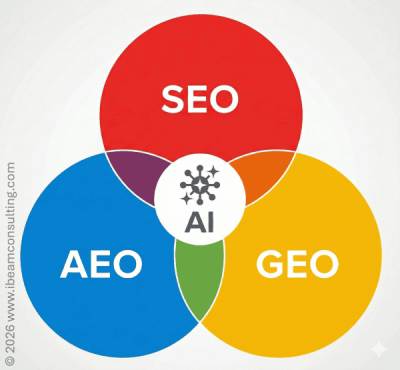
As search engines move toward AI-driven discovery – specifically Answer Engine Optimization (AEO) and Generative Engine Optimization (GEO) – these workspaces are no longer just “nice to have.” They are the essential environments for crafting the highly structured, contextually rich content required to win in the modern search landscape.
The Major Players — LLM Canvas Workspaces
Popular LLMs and AI Canvas Environments
The “Big Three” – OpenAI, Google, and Anthropic – have each debuted their own flavor of the canvas workspace. While they share common goals, their approaches differ significantly based on their underlying ecosystems.
ChatGPT “Canvas”
OpenAI’s “Canvas” is designed for the iterative writer. In early 2026, it is powered by the GPT-5.2 series, offering a more measured and grounded tone than previous models.
ChatGPT Pricing & Access
- Free Users: Limited access to the flagship GPT-5.2 model.
- Go Tier ($8/mo): A budget-friendly option for individual creators needing higher message limits than the free tier.
- Plus Tier ($20/mo): The standard for power users, providing access to GPT-5.2 Thinking for complex research tasks.
- Pro Tier ($200/mo): Unlimited access to GPT-5.2 Pro and o-series reasoning models, removing virtually all usage friction.
- Key SEO Features: Inline editing allows you to tweak H2 headers or meta descriptions on the fly. The “suggest edits” mode is particularly powerful, letting you see the AI’s changes in a “tracked changes” style before committing.
Google Gemini “Canvas”
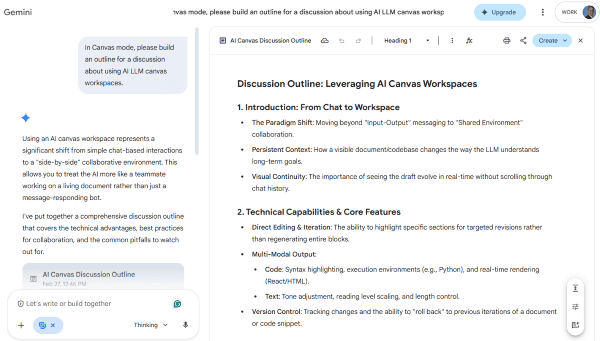
Google’s approach is about ecosystem connectivity. Gemini Canvas provides a dedicated space for complex tasks that require iterative refinement or technical visualization, deeply integrated with the Google productivity suite.
Gemini Pricing & Access
- Free Users: Access to Gemini 3.1 Flash.
- Google AI Pro ($19.99/mo): Formerly Gemini Advanced, this tier unlocks Gemini 3.1 Pro, which includes the revolutionary Deep Research mode.
- Nano Banana 2 Integration: A standout feature in 2026 is Nano Banana 2 (Gemini 3.1 Flash Image). This model allows for high-fidelity, text-accurate infographics generated directly within the canvas. It uses Google Search grounding to ensure that technical diagrams are factually correct — a major win for E-E-A-T signals.
- The Context Advantage: With a context window of up to 2 million tokens in the Pro tier, Gemini can ingest your entire site’s content history or massive competitor data dumps, making it the superior tool for high-level topical research.
Anthropic Claude “Artifacts”
Claude’s “Artifacts” feature is the most technical and agentic of the bunch. It focuses on rendering content in a clean, separate UI.
Definition: Artifacts are a dedicated side-window in the Claude interface that renders code, documents, and graphics (like SVGs or React components) in real-time. This allows users to view, iterate, and interact with complex technical outputs without cluttering the main chat history.
Claude Pricing & Access
- Free & Pro ($20/mo): Offers priority access to Claude 4.5.
- Max Tiers ($100–$200/mo): Aimed at developers and researchers, providing 25x to 100x the usage limits of the free tier and full access to Claude Code — an agentic coding environment.
- The Technical Edge: While ChatGPT is a better creative polisher, Claude is unmatched at generating structured data. It can build interactive React components, Mermaid diagrams for technical guides, or complex SVGs that help content stand out in GEO-driven search results.
Related: See my glossary of AI SEO terminology for key terms in this area. Also, see these posts for more on AI search visibility and brand visibility tools.
Visual Content in Canvas Mode — Images & Graphics
Adding the Power of Visuals to AI Canvas Documents
In the world of SEO, content is no longer just about text; it’s about the “Total Package.” Canvas modes have evolved to treat images, diagrams, and charts as first-class citizens that exist alongside the written word.
Gemini’s Nano Banana 2: The Fact-Grounded Visualizer
Google has changed the game with its Nano Banana 2 model (Gemini 3.1 Flash Image).
- Factual Grounding: Nano Banana 2 connects to Google Search to ensure that diagrams – such as technical flowcharts or localized signs – are factually accurate and up-to-date.
- Precise Editing: The canvas environment allows for a “Thinking” mode where you can adjust lighting, camera angles, and aspect ratios (up to 4K resolution). This is vital for creating high-resolution blog headers that match a specific brand aesthetic.
- Text Rendering: It excels at rendering legible text in multiple languages, making it the go-to tool for creating localized infographics for global SEO campaigns.
ChatGPT (DALL-E 3): Conversational Design
OpenAI’s approach to visuals is more conversational. When working in ChatGPT Canvas, DALL-E 3 acts as your inline designer.
- Iterative Refinement: You can generate an image and then chat specifically about it — asking to “add a coffee mug to the desk” or “change the lighting to sunset.”
- Ease of Use: It is perfectly suited for blog headers and social media thumbnails where creative flair is more important than technical precision.
Claude’s Technical Visuals: The Architect’s Canvas
Anthropic takes a completely different path. Claude doesn’t “draw” pixels; it “writes” visuals.
- Mermaid & React: Claude’s Artifacts window can render live Mermaid.js diagrams (perfect for technical SEO documentation) and interactive React charts.
- SVG Power: Because it generates SVG image files, you get infinitely scalable graphics that are lightweight and machine-readable — a hidden “win” for page load speed and technical SEO.
ChatGPT Canvas vs. Gemini Canvas vs. Claude Artifacts
LLM Canvas Comparative Analysis Highlights
Choosing the right AI canvas depends entirely on your specific SEO workflow. Here is how the Big Three stack up against each other in early 2026.
| Feature | ChatGPT Canvas | Gemini Canvas | Claude Artifacts |
|---|---|---|---|
| Primary Model | GPT-5.2 Series | Gemini 3.1 Series | Claude 4.5/4.6 |
| Primary Focus | Iterative Writing & Polishing | Research & Ecosystem Integration | Technical Structures & Agentic Code |
| Collaboration Style | Active Editor: You highlight text and the AI suggests changes inline. | Project Hub: AI manages vast data with search grounding. | Viewer/Builder: AI builds standalone “artifacts” for interaction. |
| Context Window | ~200k – 400k tokens | 1M – 2M+ tokens | ~200k – 1M tokens |
| Visual Strengths | Creative/Conversational images. | Fact-grounded infographics (Nano Banana 2). | Interactive charts, SVGs, and diagrams. |
| Integration | Standalone; Export to .docx/.md. | Deep Google Integration: Direct export to Docs/Sheets. | Standalone; Excellent for code & sharing. |
The Verdict:
- Use ChatGPT Canvas if you are a content editor who needs to “massage” a single piece of content into perfection with GPT-5.2 reasoning.
- Use Gemini Canvas if you are a content strategist who needs to synthesize 100+ sources into an authoritative SEO pillar page using Deep Research.
- Use Claude Artifacts if you are a technical writer who needs to illustrate complex systems or generate clean, machine-readable agentic code.
Supporting the New AI Search Era — SEO, AEO, & GEO
Canvas Workspaces for Comprehensive SEO, AEO, & GEO
For modern content marketers, the goal is no longer just “ranking #1.” It is “occupying the landscape.”
This requires a three-pronged approach: optimizing for Google’s traditional blue links (SEO), voice assistants (AEO), and AI-generated overviews (GEO). Canvas modes provide the perfect sandbox for this balancing act.
Traditional SEO: Structural Integrity in Real-Time
Even in the AI era, technical fundamentals like H-tag hierarchy and keyword relevance matter.
- Real-Time Hierarchy: In ChatGPT’s Canvas or Claude’s Artifacts, you can visually verify your H1-H3 structure. This ensures that “People Also Ask” triggers aren’t buried in flat text.
- Keyword Nuance: Instead of “stuffing,” canvas modes allow for “semantic polishing.” You can highlight a section and ask, “Rewrite this to naturally incorporate the entity ‘Generative Engine Optimization’ without losing the flow,” ensuring high topical relevance scores.
AEO (Answer Engine Optimization): The “Answer-First” Blueprint
AEO is about becoming the “single source of truth” for voice assistants (Alexa/Siri) and zero-click snippets.
- The “Answer-First” Block: Use the canvas to draft “definition blocks” — concise, 40-50 word answers placed directly under an H2 question.
- FAQ Generation: Gemini’s canvas mode is exceptional at identifying “missing questions” from a research report. You can instantly generate an FAQ section that adheres to JSON-LD schema standards, increasing your odds of appearing in Google’s Rich Results.
GEO (Generative Engine Optimization): Maximizing Citation Probability
GEO is the newest frontier. It focuses on how LLMs like ChatGPT and Gemini select which sources to cite in their synthesized answers.
- Deep Research for Authority: Gemini’s Deep Research mode (available in Advanced/Business tiers) allows you to cite high-authority sources automatically. By using the canvas to cross-reference your claims against peer-reviewed journals or government data, you increase your content’s “E-E-A-T” signals.
- Machine-Readable Entities: Claude’s ability to generate structured tables and lists within an Artifact makes your content highly “extractable.” LLMs prefer to cite content that is already structured in a way they can easily re-index into their own responses.
- Footnote & Source Management: ChatGPT Canvas makes it easy to manage inline citations. By including clear links and dates, you signal to AI crawlers that your information is fresh and verifiable — two of the highest-weighted factors in GEO visibility.
Professional SEO Tools with “AI Canvas” Capabilities
Consider Pro AI SEO Toolkits for Additional Canvas Value
While general-purpose LLMs are powerful, professional SEO tools have developed specialized canvases designed to do what ChatGPT and Gemini cannot: provide real-time, data-backed scoring against live SEO competitors.
Surfer SEO: The Early Leading Content Editor
Surfer was the first to popularize the “canvas” concept for SEO. Its Content Editor provides a real-time “Content Score” that updates as you write.
- The guardrails: It gives you a specific count of NLP (Natural Language Processing) keywords that your ranking competitors are using.
- Best for: Ensuring your content hits the exact semantic requirements of a traditional search engine.
Scalenut: The “Cruise Control” Canvas
Scalenut’s Cruise Mode is less of a blank page and more of a guided journey.
- The Workflow: It takes you from a primary keyword to an outline, and finally to a full draft within a single, distraction-free canvas.
- GEO Advantage: Scalenut includes a Content Optimizer that explicitly flags content gaps compared to the top 30 ranking competitors, making it a powerful weapon for Generative Engine Optimization.
Frase: SERP-Driven Strategy
Frase’s AI content workspace is built around the “SERP Research” sidebar.
- The Intelligence: Instead of just writing, Frase’s canvas lets you “read” through your competitors’ headers and summaries without leaving the document.
- Gap Analysis: Its “Topic Score” is widely regarded as one of the most accurate measures of whether a document has truly covered all facets of a subject.
Clearscope: Semantic Perfection
Clearscope is the “minimalist” choice. Its canvas focuses on Topical Inventory.
- The Philosophy: Clearscope doesn’t believe in “AI-writing” as much as “AI-guiding.” Its clean UI lists every related term and its relevance, making it easy to see exactly what is missing from your “Topical Map.”
Combining General LLMs with Professional SEO Canvases
The most sophisticated content teams don’t choose between ChatGPT and Surfer —they use them in tandem. Here is how to build a “Full-Stack” canvas workflow:
- Phase 1: Research (Gemini/Claude): Use Gemini’s Deep Research or Claude’s Projects to ingest 50+ source documents. Ask the LLM to identify the “Missing Perspective” that competitors aren’t talking about.
- Phase 2: Data Guardrails (Surfer/Frase): Paste that research into an SEO tool to generate a “Keyword List” and a “Content Score” baseline.
- Phase 3: The Iterative Draft (ChatGPT Canvas): Move the content into ChatGPT’s Canvas. Use the Inline Editor to rewrite sections until the brand voice is perfect, while simultaneously watching your SEO tool’s “Topic Score” rise in a secondary tab.
- Phase 4: Visual Polish (Gemini Nano Banana 2): Once the text is locked, use Gemini to generate high-fidelity infographics based on the exact data points used in the article.
The Synergy: General LLM canvases provide the fluency and research, while professional SEO tools provide the authority and data. Together, they ensure content is both human-readable and machine-rankable.
Best Practices — Designing Your SEO Workflow in Canvas
A Few Tips to Maximize Canvas Mode Value
Simply having access to a canvas mode isn’t enough; you must know how to direct the AI to stay within the boundaries of your SEO strategy.
The Prompting Strategy: Triggering the Canvas Workspace
To get the best results, you need to prompt for a workspace, not just a response.
- Instead of: “Write a blog post about SEO.”
- Use: “Let’s draft an SEO pillar page together in a collaborative workspace. Start by generating a comprehensive outline that addresses these three primary keywords…”
- Why it works: This signals to models like ChatGPT or Claude that you intend to edit the document iteratively, often triggering “Canvas” or “Artifacts” mode automatically.
Human-in-the-Loop: “Suggest” over “Rewrite”
The biggest mistake in AI-assisted SEO is hitting the “Rewrite” button too often. This dilutes your brand voice and can lead to “AI-isms” that Google’s quality algorithms may flag.
- The Better Way: Use the “Suggest Edits” mode (available in ChatGPT) or localized highlights. Highlight a single sentence and ask the AI to “Make this sound more authoritative for a B2B audience.” This keeps you in the driver’s seat while the AI acts as the specialized mechanic.
Canvas Modes & Multi-channel Remixing
The true power of an AI canvas is that it acts as a “source of truth” for an entire campaign. Once your main blog post or content piece is finalized in the canvas:
- Highlight the Intro: Ask the AI to “Generate three LinkedIn hook variations based on this section.”
- Highlight the Conclusion: Ask to “Draft an email newsletter summary in a separate artifact.”
- The Result: You maintain a perfect semantic link across all channels, which is a key signal for Topical Authority.
Want to stay updated on my AI SEO-related content? Add your email details below for periodic updates straight from me (David).
Your email info is safe here. We don’t sell, rent, or share your details with outside parties. You can easily unsubscribe at any time.
Like this post? Quickly share it with your social networks here.
SEO Content & AI Canvas Modes — Closing Thoughts
The Future of the AI Content Workspace: Beyond the Chat Box
The era of “talking” to an AI is quickly being superseded by the era of “working” with an AI.
For SEO professionals, this shift from linear chat to collaborative canvas represents a massive opportunity to scale quality without sacrificing the technical precision required for AEO and GEO visibility.
Final Verdict: Choosing Your Tool
- For Research-Heavy SEO: Choose Gemini Canvas to leverage its 1M-token context and Deep Research capabilities.
- For Polishing & Creative Tone: Choose ChatGPT Canvas for its superior iterative editing UI.
- For Technical Guides & Structured Data: Choose Claude Artifacts for clean, machine-readable SVG and code outputs.
Next Steps for SEO Professionals
If you are comfortable with the basics of LLMs but haven’t yet integrated “Canvas Mode” into your workflow, here is your roadmap for the next 30 days:
- Start with “Small Edits”: Take an existing low-performing blog post, paste it into ChatGPT Canvas or Claude, and practice rewriting only the H2 headers and Intro using the inline editor.
- Generate a Visual Asset: Use Gemini’s Nano Banana 2 to create a fact-grounded infographic for that same post. Pay attention to how it renders text compared to other models.
- Build a Knowledge Base: In Claude (Pro), create a “Project” and upload your company’s internal style guide and successful past blog posts. Ask it to generate an “Artifact” that adheres strictly to those standards.
- Test the Synergy: Open a trial for Surfer or Scalenut and try the “Full-Stack” workflow: Research in Gemini, Draft in ChatGPT, and Grade in the SEO tool.
The search landscape is changing, and the “blue link” is no longer the only goal. By mastering these collaborative workspaces, you ensure that your content is ready for the AI-driven future of discovery.
Questions or Comments?
I hope this overview of AI LLM canvas features and related tools has been helpful! Let’s wrap up with a few final questions for you:
- How much (or little) do you use AI content tools in your current SEO production workflow? Do you use “canvas modes” in any LLMs today?
- How, if at all, do you incorporate paid/professional SEO content optimization tools in your workflow today? (Frase, Surfer, etc.)
- What are the major pros and cons of your current SEO-focused content process?
Feel free to add more in the comments below with any thoughts, feedback, or related questions. Thanks also for any social shares on this post!
