
Last updated Apr 6, 2024
How to Find Your Website’s Ranking Keywords
Determining the keywords and search queries for which your website or blog ranks well is a fundamental part of SEO.
There are easy and free ways to do this, as well as paid/premium SEO tools that add more value and insights to the process.
In this post, we’ll look at finding your ranking keywords with some key tactics and tools, plus a few good ways to expand your ranking keywords for even better visibility in organic search.
Let’s take a closer look below…
This post contains a few referral links to vendor partners. We may receive compensation for purchases made via these links, at no additional cost to buyers.
SEO Keywords and Ranking Visibility
Which Search Queries Result in Good Visibility for Your Site?
Website and blog owners/managers who want to earn visitor traffic from organic search sources (Google, etc.) naturally want to know which keywords (search queries) drive good visibility and click-throughs.
In many cases, the search queries that you think should drive organic rankings, visibility, and traffic are just the starting point. There may be hundreds or thousands of user queries that also drive good visibility for you — often as variations of your core content themes and topics.
So, determining the actual ranking keywords or search queries for your site is an interesting and useful exercise.
Overall Website Rankings
It’s also important to distinguish between overall website rankings and visibility vs the important individual pages or posts on your site.
For example, your overall site may rank for thousands of keywords, whereas your most important pages/posts may only rank well for a few dozen keywords in each case.
SEO and ‘Important’ Content Rankings
SEO practitioners and website content marketers understand that there’s a big difference between ‘important pages’ and ‘unimportant pages’ from an SEO standpoint.
Important pages for SEO are those that need to attract organic search traffic for specific user queries or a range of related queries. They are ‘SEO landing pages’ in this way. Collectively, they may drive the large majority of your site’s organic search traffic.
Understanding how well these pages/posts rank for specific search queries is a primary thrust for SEO practitioners. Analyzing ranking data helps identify opportunities to improve relevance and visibility for target keywords. Additionally, it can uncover issues like the wrong page ranking for keyword intents, which may signal misaligned content or technical SEO problems.Addressing these discrepancies ensures that the most appropriate pages are shown to users, driving better engagement and conversions.
What Is a ‘Good’ Ranking?
What does it really mean to have a ‘high-ranking website’ or a specific content page with ‘good rankings’?
For many people, this means having important pages or posts appearing on Google page 1, preferably #1 (of course!) or in the top 3-5 ranking positions for specific target search queries.
However, what does having a website with good rankings in organic search actually do for you? What quantifiable benefits does it produce?
It’s good to get fairly specific about what having a high-ranking website means to you and your business. Try not to become attached to vanity metrics in SEO.
SEO and Finding Ranking Keywords — Three Types
Simple to Advanced Keyword Ranking Analysis
Fortunately, there are several good ways to determine which keywords drive good rankings for your site and important content pages.
Of course, you can always manually type a target keyphrase/query into Google and visually inspect the search results to see if you’re on Google page 1 of the SERP.
But this is terribly cumbersome for anything more than a quick casual check for a few keywords you have in mind. It’s much better to let SEO automation tools do the work for you.
Actual User Search Queries — Google Search Console
For Google-centric SEO work, the free Google Search Console (GSC) platform is your best tool for understanding how your website or blog content ranks.
Bing Webmaster Tools (BWT) is also useful and free. It is Bing search-focused, of course, but has other helpful tools as well.
Within GSC’s performance report, you’ll find essentially all the actual user search queries that Google knows about for your domain.
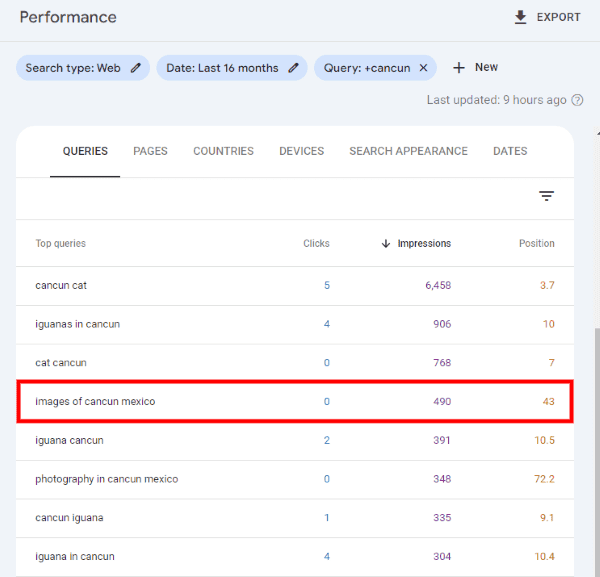
Here’s an example from GSC’s performance report for my travel photography website. This sample looks at queries specific to a Mexico-themed topic.

Note the red highlighted queries/keywords that show high impressions but weak average ranking positions and low or no clicks during a selected time period.
These are what I call ‘Google Search Console opportunity keywords’ — also discussed further below.
Pro Tip: Use GSC’s filtering features and date range comparisons to focus your analysis on specific areas and timeframes of interest.
Keywords You Are Actively Tracking
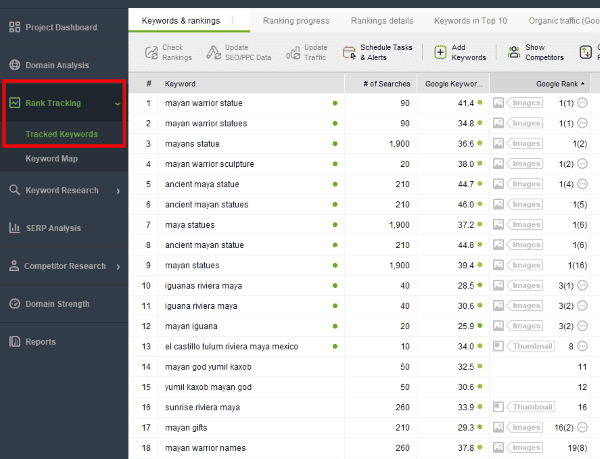
If you’re using a 3rd-party rank-tracking tool, it will also provide insights into your SEO rankings for specific keywords.
These keywords/queries will usually overlap with what you see in GSC (or Bing’s BWT) but can include others as well.
The difference is that you may be actively tracking keywords that do not drive organic search impressions yet in GSC. This is one of the benefits of a 3rd-party rank-tracking tool, vs relying 100% on tools like GSC or BWT for ranking data.
Here’s an example, using SEO PowerSuite’s Rank Tracker application.
Ranking Keywords Not Tracked
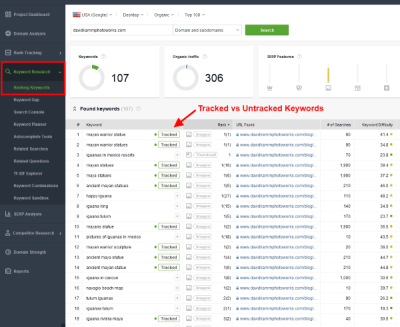
Things get even more interesting when you start to look into keywords for which your overall website or specific pages rank, but that you don’t currently track in a rank-tracker or see in GSC.
Here’s an example from SEO PowerSuite’s ‘Ranking Keywords’ module within its collection of keyword research tools.

Tracked vs Not-Tracked Keywords
In the screenshot above, I can easily spot keywords that I rank for but do not actively track. I can incorporate other metrics (like estimated search volume and organic search keyword difficulty) to help me decide which additional keywords to start tracking.
SEO PowerSuite also includes powerful and flexible filtering capabilities that really help users zero in on specific keywords, topics or themes, etc.
Here’s another example, this time from SEO PowerSuite’s ‘Keyword Sandbox’ module within the main keyword research area of the Rank Tracker application.
By sorting on the ‘Found in’ column, I can easily spot ranking keywords among the broader set of keyword ideas collected in the ‘Keyword Sandbox’ module of SEO PowerSuite’s Rank Tracker toolkit.


SEO Tools and Keyword Ranking Databases
You might wonder: How do SEO software tools know that you’re already ranking for certain keywords when you’re not actively tracking them in the tool for a specific SEO project?
One way they know this about your site — usually before you do — is that they continuously collect ranking data based on all of their customers’ SEO rank-tracking activities.
The tools may collect keyword ranking data for your domain based on rank-tracking for another user’s SEO project 100 miles away or halfway around the world. Then it all goes into the software vendor’s ever-evolving keyword database in the sky.
That’s why tools like the Ranking Keywords module in SEO PowerSuite, and similar functions in other SEO platforms, are so powerful and insightful.
It also helps explain why some SEO tools seem quite expensive. There’s a lot going on ‘under the hood’ of these platforms, so to speak, and it all costs real money for the software companies providing these tools.
Related: Learn more here about alternatives to premium SEO tools like Ahrefs, as well as how SEO PowerSuite compares to Ahrefs, Semrush, and other premium toolkits.
Expanding Your SEO Keywords & Rankings
How to Proactively Boost Your Keywords and Rankings
Over time, search engines like Google and others may naturally start to show your site’s content for an increasing number of user search queries. Especially for brand new content that is just getting a foothold in organic search visibility.
It takes time for search engines to fully crawl and assess your content, collect various ranking signals, and decide where to surface your content pages for various queries.
This is a ‘passive’ organic impact from your perspective. Expansion of ranking keywords can happen even if you do nothing further to your content.
However, there are ways to influence keyword expansion and visibility in your favor. You can take more proactive steps to broaden your visibility for good keywords related to your core topic(s).
Here are a few things you can do for proactive SEO improvements.
Google Search Console — ‘Opportunity Keywords’
As I noted above, in Google Search Console, good target search queries for which your important content doesn’t rank in the top 10-20, but perhaps in the 30-50 range, may be great ‘GSC opportunity keywords’ for you.
These are potentially valuable queries that drive impressions for your site and content, but not (yet) in very good average ranking positions.
See the GSC example below.
If I decided to further target the specific query highlighted here, I would evaluate the specific pages or blog posts already causing impressions for it, looking for ways to incorporate that keyphrase more prominently.
Beyond that, I might develop completely new content centered on that query or keyphrase.
Keyword Rank Tracker Ideas
As illustrated in the screenshots above from SEO PowerSuite’s Rank Tracker application, you can also find keywords here that your site ranks for, but in worse (higher-numbered) ranking positions that are unlikely to produce good visibility and search traffic (clicks).
You may also find some of these keywords/queries in your Google Search Console data, but the overlap here may not be 100%.
In any case, you can use these keyword ideas selectively to:
- Add them specifically and strategically to existing content. As search engines recrawl your content and discover these additions, you may see increased visibility for these newly added terms.
- Produce brand new content pieces that are highly focused on specific user queries or topics. In many cases, an ‘Article A’ that consistently ranks poorly for a good opportunity keyword can be complemented by a new ‘Article B’ that hits the target keyword/topic much more squarely. Then watch how your rankings and traffic shift over time for both articles.
SEO Tools and Google Search Console Integration
Many SEO toolkits allow (and encourage) you to connect your Google Search Console account with the tool. This allows the SEO software to collect keyword data from GSC, broadening its understanding of your current ranking keywords/queries.
By making this connection, you can get more keyword metrics for your GSC keywords — data that are not provided by GSC alone. Notable examples here include estimates of search volume and keyword difficulty.
Here’s how you get started with that in SEO PowerSuite’s Rank Tracker application.

Good to Know: Many robust SEO software platforms support connecting to popular external tools like GSC and Google Analytics. Learn more here about integrating SEO tools with Google Search Console and other outside data sources.
SEO Competitors — Keyword Gap Analysis
You may have top competitors in SEO that routinely rank above or near you for many of your core target topics and queries. You spot them in Google SERPs all the time for your target keyphrases, and some of them may be your real-world business competitors as well.
An SEO competitor keyword gap analysis can help you expand your universe of ranking keywords, leading to more organic visibility and search traffic for a wider range of user queries.
SEO keyword research tools from various vendors can help with this.
Here’s how you get started with competitor gap analysis in SEO PowerSuite.
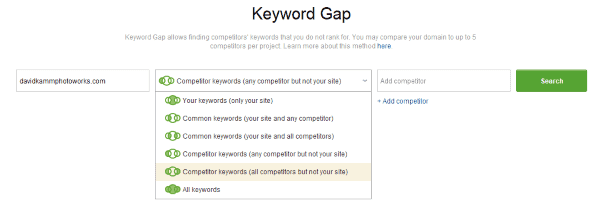
The keyword gap analysis tool shown above offers multiple ways to identify competitor keyword gaps. This is based on the 1+ competitive domains you enter into the tool, to be compared against your site.
See the tiny green Venn diagram icons above for:
- Your keywords — only your site (mostly a baseline for reference)
- Common keywords — your site and any competitor
- Common keywords — your site and all competitors
- Competitor keywords — any competitor but not your site
- Competitor keywords — all competitors but not your site
- All keywords — Your site and all competitors
Related: Many of these SEO keyword expansion ideas are also included in these tips for what to do after publishing new content and how to improve existing SEO content.
Finding Your Ranking SEO Keywords — Closing Thoughts
Gain Important SEO Insights from Key Tactics and Tools
As I’ve highlighted above, it’s not very hard to identify your website’s ranking keywords. Free webmaster-focused tools like Google Search Console and Bing Webmaster Tools are great places to start for your domain.
Aside from GSC and BWT, other SEO toolkits and software platforms can also be a big help in this area.
You can track hundreds or thousands of target keywords in your preferred rank-tracking tool, identify other currently-ranking keywords that you didn’t even know about, and even research your SEO competition’s keywords to look for interesting keyword or topic gaps you can work on closing.
Taken together, these tools and methods can help you understand and then expand your universe of ranking keywords for your site or blog.
If all goes well, you’ll see in Google Search Console and/or your favorite rank-tracking tool that your set of ranking keywords/queries is indeed expanding, and your site traffic from organic search sources is growing as well.
Questions or Comments?
I hope this brief overview of finding your ranking keywords for SEO purposes has been helpful! Here are a few related questions for you:
- For your business or personal website or blog, do you have a good sense of what your ranking keywords are? Are they the ‘right’ keywords or search queries for your most important content?
- Do you use free SEO tools like Google Search Console, Bing Webmaster Tools, or other webmaster toolkits to track your ranking positions over time?
- If you use 3rd-party tools to track SEO keyword rankings, how does this data compare with what you see in GSC or BWT? Do these tools provide helpful insights about new keyword opportunities or competitive keyword gaps you can work on?
Feel free to add more in the comments below with any thoughts, feedback, or related questions. Thanks also for any social shares on this post via the buttons below!
