
Last updated Jan 28, 2025
Understand the Main Limits of Google Search Console for Rank Tracking
For website owners interested in tracking their Google rankings for keywords and specific content pages, Google Search Console (GSC) is indeed a very powerful tool.
However, GSC has several important limitations in areas of rank tracking, so it’s important to understand these.
This post covers several Google Search Console rank-tracking limitations, while also illustrating how other SEO tools can help overcome them.
Let’s take a closer look below…

This post contains a few referral links to select vendor partners. We may receive compensation for purchases made via these links, at no additional cost to buyers.
SEO Rank Tracking with Google Search Console
The Primary Free SEO Tool for Google Search Performance Tracking
Many website and blog owners are at least somewhat familiar with Google Search Console, the free webmaster toolkit from Google for tracking search performance and other areas of interest relative to Google-centric SEO.
(In fact, it went by the name ‘Google Webmaster Tools’ prior to its rebranding.)

Google Search Console, or simply GSC for short, provides important search performance metrics for websites and blogs. These metrics include ranking positions for specific user queries ( keywords or ‘keyphrases’) and pages, as discussed further below.
GSC also helps uncover website health issues and other factors that can impact visibility in Google search. It’s an essential Google SEO auditing tool in this way.
Let’s look more closely now at GSC’s primary limitations in the area of SEO rank tracking. I’ll compare it to 3rd-party SEO tool capabilities as well, using SEO PowerSuite as an example of a professional rank-tracking software tool.
Google Search Console Limitations for Rank Tracking
Main GSC Limits for Tracking Website Ranking Performance
While Google Search Console has many strengths as a free Google SEO tool, it also has several limitations or deficiencies to be aware of.
One of these areas is rank tracking, which is part of GSC’s performance reporting capability.
Here are the main limitations in the rank-tracking area of GSC.
GSC is Only for Your Site’s Google Search Performance
This first GSC limitation may be super obvious, but here goes anyway.
Google Search Console is only for tracking your ranking positions and other performance metrics on Google.
Not on Bing, YouTube, Yahoo, DuckDuckGo, Yandex, etc.
Just Google.
For anyone new to using GSC, here’s a quick look at the Performance report in Search Console. Note the four primary metrics:
- Total clicks
- Total impressions
- Average CTR (click-through rate — clicks divided by impressions)
- Average position (the rank-tracking part of GSC search performance)

Since many website owners care primarily (or even exclusively) about their organic search visibility on Google, this limitation, by itself, may not be a problem at all.
It’s just something to remember, especially for anyone new to SEO work and using GSC.
Google Search Console has other website auditing benefits as well, but these are outside the scope of this post.
Pro Tip: If you’re not already using GSC, go here to get started using Google Search Console.
On a related note, GSC only tracks SEO performance data for your website or blog, not for any competitive domains.
In short, Google Search Console is not useful for SEO competitor analysis. (See the SERP analysis screenshot below as well.)
Related: For insights into Bing search performance, read more here about Bing Webmaster Tools (BWT) vs Google Search Console. BWT has some features lacking in GSC, and vice versa.
GSC Tracks Only Actual User Queries
This next one is both a strength and a limitation of Google Search Console.
GSC only collects and reports on actual user search queries that come into Google from around the world.
Not hypothetical keywords/keyphrases that you may also want to check for potential rank-tracking purposes. This means that GSC also has some key limitations when doing basic Google keyword research.
In GSC, you’ll see actual user queries exactly as they are entered. This includes alternate spellings, mis-spellings or typos, voice search commands (often in complete sentences), etc.
A key strength of GSC in this area is that you can get further keyword/query ideas that can help you to further ‘SEO-optimize’ your site’s content.
The main GSC limitation here is that you can’t check rankings for queries and keyphrases that haven’t yet caused Google search impressions for your site.
Related: Learn more here about GSC’s limitations for keyword research.
GSC Has a Limited (16-Month) Tracking Window
Google Search Console only tracks up to 16 months of performance data. In many cases, this is a long enough time window. But in others a longer lookback period is helpful.
Since we know that SEO can take some time to work well, having a longer time period for rank-tracking purposes can be helpful. Especially for tracking the ranking progress of core topics and strategic keywords for a website or business.
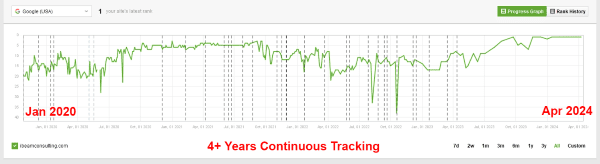
Aside from GSC, many 3rd-party SEO software suites provide longer rank-tracking periods. Here’s an example (below) using SEO PowerSuite’s Rank Tracker application.
It’s often quite interesting to see the long-term (multi-year) ranking changes and consider what may have caused rankings to rise or fall.
Want to stay updated on my SEO-related content? Add your email details below for periodic updates straight from me (David).
Your email info is safe here. We don’t sell, rent, or share your details with outside parties. You can easily unsubscribe at any time.
GSC Doesn’t Show Google SERP Features
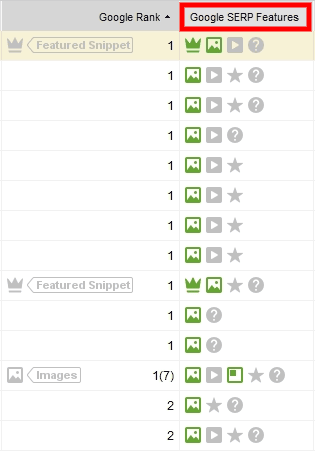
Unlike 3rd-party rank tracking tools, Google Search Console doesn’t highlight the various ‘SERP features’ that appear for specific user queries and results pages.
For example, if your content ranks high enough for a specific query, it may earn a ‘Featured Snippet’ placement at the top of the SERP. Professional rank-tracking tools will tell you this, but GSC does not.
This is also an area where professional SERP analysis tools add value, such as the examples from SEO PowerSuite’s Rank Tracker application shown below.

Pro Tip: Learn more here about how many SEO software platforms can integrate with your Google Search Console (and also Google Analytics) properties for deeper SEO insights.
GSC is Not Useful for Local Search Rank Tracking
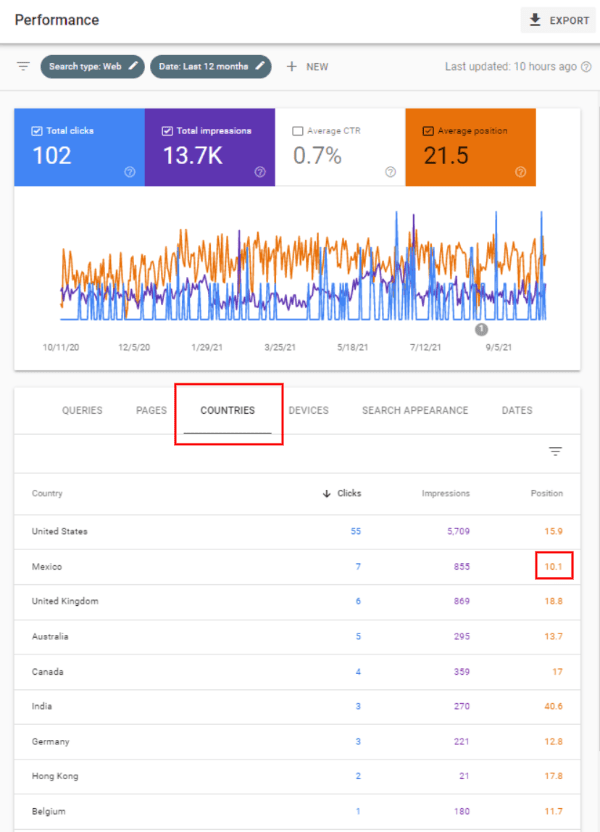
Google Search Console does provide country-level search performance metrics but does not provide any more granular location-based search data.
So, you’ll need 3rd-party SEO tools to check rankings for searches coming from specific regions, states, provinces, metro areas, cities, ZIP codes, etc. Look for tools that have features and capabilities that are very specific to doing ‘local SEO’ work.
Here’s an example of reporting on country-level search performance in GSC.
GSC Data is Impacted by 3rd-Party Rank Checkers
This one is perhaps not so obvious for new users of Google Search Console.
The main issue here is this: The global activity of 3rd-party rank-checking tools can impact your search performance data in GSC.
How so? Because automated rank-checking tools generate queries (simulating human searches) that drive impressions in Google search results. That’s how the SEO tools are able to collect ranking positions, ranking page URLs, visible SERP features, etc.
Depending on your content topics and target keywords/keyphrases, this automated search activity can artificially inflate your impressions data in GSC while also impacting average ranking positions and lowering CTR (click-through rate) metrics.
Here’s an example I spotted while analyzing GSC data. With further digging, I was able to identify the specific keyphrase/query that was causing these regular Wednesday spikes.
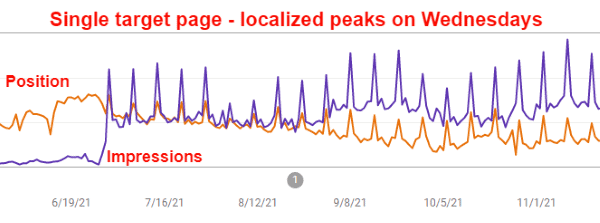
Pro Tip: In your GSC performance timeline, look for highly regular spikes in impressions for specific pages and/or queries. If you spot a repeating pattern, that’s a good sign that you have a popular keyword/topic that other people are triggering via automated rank-checking tools.
Related: Learn more here about how automated rank-checking tools impact Google Search Console metrics. This is an actual case study based on real website GSC data. Also, read more here about SEO case studies in general, and how SEO tools vendors use case studies and success stories.
Like this post? Quickly share it with your social networks here.
GSC Rank Tracking Limitations — Closing Thoughts
Still a Highly-Useful Free Google SEO Tool — With Known Limits
Even with the limitations I’ve noted above, Google Search Console is still a very helpful resource for SEO performance tracking. I use it all the time and recommend it to others as well.
GSC is one of my essential free Google SEO tools for sure. It’s also a great starting point for those doing only minimal SEO work on their site(s), as well as when SEO is mostly a secondary or supporting marketing channel.
I also use paid SEO tools, primarily SEO PowerSuite, for all the benefits these advanced SEO platforms can provide on top of free tools like GSC.
For other options in this area, learn more here about several affordable SEO tools. Most of the popular all-in-one SEO tools and software suites also provide advanced rank-tracking capabilities, among many other SEO tasks and activities.
In the end, I hope you’ll use GSC to its maximum potential, with good awareness of its strengths and limitations for rank-tracking and other SEO areas.
Questions or Comments?
In closing, I have just a few related questions for you:
- Do you use Google Search Console today? What aspects of GSC do you like and dislike the most?
- What other SEO tools (if any) do you prefer for keyword rank-tracking?
- If you use both GSC and other SEO toolkits, have you connected them in any ways that provide better actionable SEO insights? Why or why not?
Feel free to add more in the comments below with any thoughts, feedback, or related questions. Thanks also for any shares on this post via the social sharing buttons.
