
Last updated May 9, 2024
Find Your Google ‘Featured Snippets’ with Pro SEO Rank Tracking Tools
Winning a top ranking on Google or other major search engines for your most important content topics is a solid SEO accomplishment.
Earning a ‘Featured Snippet’ is even better. Sometimes, you’ll win featured snippets without even knowing it!
This post is about finding your featured snippets on Google, etc., including some tips and tools that can help.
Let’s dig into the details below…
This post contains a few referral links to vendor partners. We may receive compensation for purchases made via these links, at no additional cost to buyers.
‘Featured Snippets’ in Organic Search Results
Extra Visibility and Clicks for Some Top-Ranking Keywords
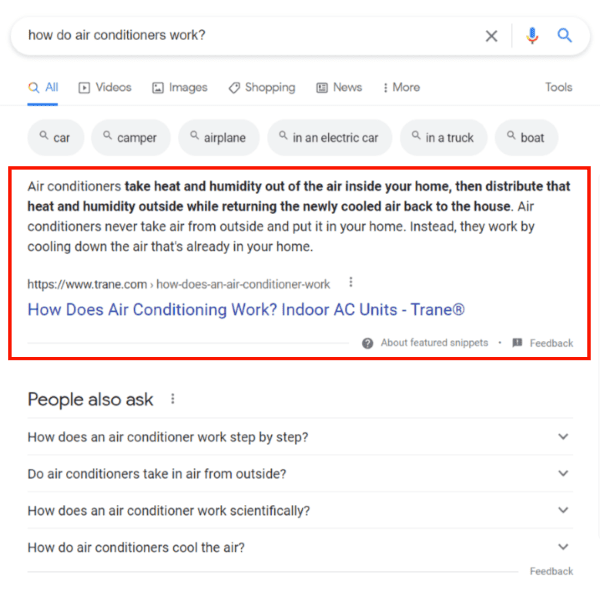
When using Google search (or Bing, etc.), have you noticed the prominent result in the top spot of some searches?
In Google terminology, this ‘showcase’ top organic result is often the ‘Featured Snippet’ for that user search query.
Some searches produce these at the top of the SERP — Search Engine Results Pages — while other searches do not.
Here’s an example.
This next example is from Bing. It uses an AI-generated (Copilot) ‘snippet’ that includes references/links to four sources. Note that the individual result from Carrier is also near the top of the Bing SERP but below the Copilot-generated AI result.

How to Find Your Featured Snippets
Keyword Rank-Tracking Tools Automate Featured Snippet Discovery
Google’s ranking algorithm(s) decide which pages earn featured snippets for various specific search queries. Featured snippets can also appear and disappear, even for the same content that maintains a #1 ranking position.
It’s all up to Google’s algorithmic decision-making processes, including which ‘SERP features’ to include for user queries. Of course, Bing and other major search engines make their own calculations and decisions about appropriate SERP features.
But here’s the challenge: Google doesn’t notify you (the website owner and search optimizer) when you’ve earned or ‘won’ a featured snippet.
You may be able to guess and discover them manually if you know your top-ranking keywords (search queries) and can check for them periodically. But this is a tedious way to try to find your featured snippets.
Google Search Console and Featured Snippets
You may also wonder: ‘Can Google Search Console tell me if I’ve earned/won a few featured snippets?’
Answer: Nope.
The ‘performance report’ in Google Search Console (GSC) tells you your average ranking positions on Google for specific user queries and/or landing pages but doesn’t highlight your earned featured snippets.
This, by the way, is one of the limitations of using Google Search Console as a rank-tracking tool.
In fact, you may have several top-ranking featured snippets that you don’t even know about. That’s a good problem to have, though for SEO performance evaluation purposes I’d much rather know about them than not!
Keyword Rank Tracking Tools and Featured Snippets
To find your featured snippets, look to good keyword rank-tracking tools from quality SEO software providers.
Good rank-tracking tools will not only discover ranking positions for your target keywords but will also tell you which SERP features you’ve won — including the coveted featured snippets.
Here’s an example from SEO PowerSuite’s Rank Tracker application.

In the SEO PowerSuite example above, three keywords (not shown here) have #1 rankings in Google and also featured snippets (note the ‘crown’ icon).
Other SERP features shown here include images, videos, thumbnail images, reviews (star ratings), ‘people also ask’, and PPC ads (top or bottom of SERP). The various SERP feature icons become green when you’ve won them for a specific keyword/query.
This example is from SEO PowerSuite, which I use regularly and recommend. Other professional SEO rank-tracking tools may provide similar functionality.

Finding Your Featured Snippets — Other Tips
Here are three helpful approaches for finding your featured snippets on Google.
Use Filters in Your Existing Keyword Rank-Tracking Tools
As I showed above using SEO PowerSuite’s Rank Tracker application, good rank tracking tools, including those in all-in-one SEO toolkits, will help you quickly identify your featured snippets for your high-ranking keywords and landing pages.
Look for ‘SERP features’ filtering options in your rank tracking software for this option.
Add GSC Top-Ranking Keywords to Your Rank Tracker Tool
While Google Search Console by itself doesn’t identify your featured snippets in its performance reports, you can still use it to help identify potential featured snippet keywords. Here’s the basic approach:
- In your GSC performance reporting, apply a table filter to find only those queries for which you have a ‘top 3’ average position. Within that set, identify the queries that make the most sense for your site and core topics, then export them (or simply cut/paste them) into your rank-tracking tool or application for ongoing tracking.
- Run a rank-tracking process on the newly added keywords/queries in your rank-tracking tool or application. Look for any new featured snippets that may surface from this task. These will likely be featured snippets you didn’t previously know about.
This approach combines GSC’s knowledge of your actual high-ranking keywords/queries with the power of professional rank-tracking tools to identify featured snippets and any other SERP features that add to your overall SEO visibility and performance.
Discover Other Ranking Keywords That Also Produce Featured Snippets
Going back to your preferred keyword research and rank-tracking toolkit, look for options that show your current ‘ranking keywords’ and check for other featured snippet wins there.
- Note that these are keywords that your SEO software knows you rank for, but you may not be actively tracking. You can add these search queries to ongoing rank-tracking as you see fit.
- Some of these keywords may also appear in your Google Search Console performance data if they have produced actual impressions for your site in recent months. Your 3rd-party tools may also support integrating Google Search Console data into your SEO platform for easier data collection from GSC.
- This is all part of finding your ranking keywords more generally, whether or not they’ve earned featured snippets or other SERP features.


SEO & Finding Your Featured Snippets — Closing Thoughts
It’s Great to Know Which Featured Snippets You’ve Earned
If you’re working on website optimization, SEO-focused content, and related activities, it’s great to know when Google, Bing, etc., have rewarded your efforts with high rankings in organic search.
It’s even better when your efforts result in higher-visibility SERP features like Featured Snippets. That extra attention for your content should pay off in more organic clicks and visits to your website or blog, and more opportunities for website goal conversions, new business, etc.
Finding your hard-earned featured snippets can involve manual guesswork and test searches — unless you have tools available that help you identify these wins. Check your current rank-tracking tool(s) for these capabilities, or try proven SEO platforms like SEO PowerSuite as another option.
More broadly, the area of SERP features is certain to keep evolving, especially now with AI-generated answers appearing at or near the top of some search results.
But as long as featured snippets or equivalent SERP features exist, it’ll be good to have easy and automated ways to keep track of them.
Questions or Comments?
I hope this brief introduction and tips for finding the featured snippets you’ve won in search results have been helpful! Here are a few related questions for you:
- For the SEO keywords you actively track today, how many have produced featured snippets for you? How did you first discover your featured snippets?
- Which SEO tools, if any, have helped you track featured snippets or other SERP features?
- Has your site content also been featured/linked within AI-generated search results on Google, Bing, or other major search engines with AI capabilities?
Feel free to add more in the comments below with any thoughts, feedback, or related questions. Thanks also for any social shares on this post via the buttons below!
